
Hardware
Based on the makers’ specs and my own testing where I say so.
What a 75 percent gaming keyboard is
Is a 75% keyboard right for gaming? What you keep, what you lose, and three boards worth buying.
Updated 10 min readYuval Eizik
- pc
- keyboard
This article has affiliate links. If you buy through them, I may earn a small commission at no cost to you. Prices move fast, so check the store for today's price before you buy.
Read the disclosure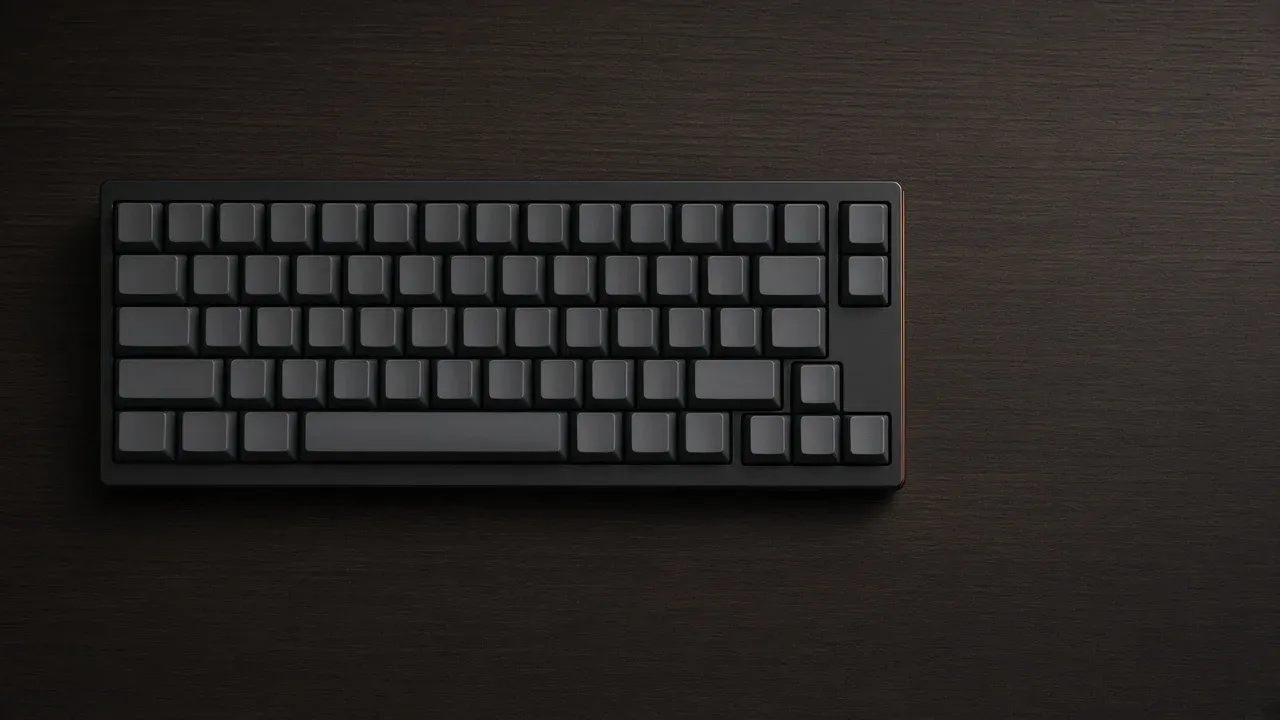
On this page
- 75 percent boards worth a look
- Which cut is yours
- What the two compact boards share
- Where the keys move
- The gaps are how you find the keys
- Size and fit
- Keycaps have to name the size
- What the layout leaves alone
- The pad, when you still want it
- Left hand, UHJK, and which row I would keep
- The photo, then the switch
- How to choose
- The decision
As an Amazon Associate I earn from qualifying purchases. I earn a small commission from Amazon links, at no cost to you. See disclosure.
Like the idea of a tenkeyless board but want even more room for your mouse? A 75 percent gaming keyboard is a tenkeyless board with the gaps squeezed out. The number pad is already gone on both. The function keys and the arrow keys stay as their own keys. The arrows sit against the modifiers, and the navigation cluster is usually a column instead of an island.
I play left-handed on UHJK. The Razer Naga Left-Handed already holds buffs and consumables on the 12-button grid, and the scroll wheel is trinket plus interrupt. The F-row matters more in WoW — Devastation Evoker, Tingyoudied, EU-Ravencrest — than it does on Zarya. For full picks, see the best gaming keyboards. If you’re still choosing a size, how the sizes differ covers the bigger picture. Here we focus on the 75 percent layout. More keyboard guides.
75 percent boards worth a look
- Wired 75 percent, hot-swap, aluminum top: Razer BlackWidow V4 75%. From $139.99. Razer’s page and master guide: compact 75 percent with a real function row and real arrow keys; the FAQ also keeps Delete, Page Up, Page Down, and Insert. 5052 aluminum top, gasket-mounted FR4 plate, hot-swap 3-pin or 5-pin sockets, Razer Orange tactile in the assembled SKU, up to 8000 Hz polling, N-key rollover, magnetic leatherette wrist rest, 321 × 155.5 × 24 mm and 815 g without the rest. Razer US page. Amazon search for BlackWidow V4 75%
- Wireless 75 percent, tri-mode: Corsair K65 PLUS WIRELESS. Official US MSRP $159.99 on Corsair’s product page. Official: 75 percent form factor, 320 × 136 × 35 mm, 0.918 kg, pre-lubed MLX Red linear switches at 45 g, 1.9 mm actuation, 4.0 mm travel, 5-pin hot-swap, 2.4 GHz / Bluetooth / USB, 1000 Hz polling, NKRO, 4200 mAh, up to 266 hours with 2.4 GHz and RGB off, rotary dial, two-year warranty. Corsair’s size guide says this chassis keeps Delete, Home, Page Up, and Page Down on the right edge. Corsair K65 PLUS WIRELESS. Amazon search for K65 PLUS WIRELESS
- Wireless 75 percent, metal, QMK: Keychron Q1 Max. Official shop $229.99. Official: 75 percent ANSI with a knob, aluminium case, gasket mount, Gateron Jupiter hot-swap, 2.4 GHz / Bluetooth / wired at 1000 Hz, 4000 mAh / up to 180 hours, NKRO, 145 × 327.5 mm, 1724 g ± 10 g assembled. Keychron Q1 Max. Amazon search for Q1 Max
The short version: 75 percent keeps real F-keys and real arrows and gives the gaps back to the mouse.
Which cut is yours
Do you use the number pad every day?
If you do, stay full-size. A 75% board does not have that pad.
If the number pad is a daily tool, stay full-size. If the F-row and the arrows can live on a held Fn key, a 60 percent board is smaller than this one. The 75 percent choice is the middle of those two answers: you want those keys printed, and you want the desk back.
| Layout | Own keys that stay | Usual cut | Example |
|---|---|---|---|
| Full-size | Number pad, F-row, arrows, nav island | You type numbers every day | Skip it |
| Tenkeyless (TKL) | F-row, arrows, nav island. No pad | You want the gaps your hand already knows | See the size page |
| 75 percent | F-row and arrows, nav as a column. No pad | You want those keys in less width | BlackWidow V4 75%, K65 PLUS, Q1 Max |
| 65 percent | Arrows often stay. F-row often a layer | You can play without physical F-keys | Keychron treats F-keys as combinations |
| 60 percent | Letters and a Fn layer | You can play without physical arrows | A smaller cousin, not this shape |
What the two compact boards share
A tenkeyless board and a 75 percent board both delete the number pad. Keychron’s size guide from 28 January 2021 puts a tenkeyless layout at 87 keys and a 75 percent layout at 84. It also calls 75 percent a compact tenkeyless, the shape a lot of laptops already taught people. Corsair’s size guide says the same pairing in different words: TKL is full-size without the pad, and 75 percent is that board with the empty space removed.
The counts are close because the letters, the number row, the function row, and the arrows are still there. A listing that prints a number a few keys off those figures is still this shape if the photo shows those rows. A rim, a knob, or a macro column can add keys without changing the cut. The photo is the check.
Where the keys move
The difference is the empty space. On a tenkeyless board the function row is a spaced line, the arrows sit in their own island, and the navigation cluster is six keys: Insert, Home, Page Up, Delete, End, and Page Down. A 75 percent board removes those gaps. The function row is still a row of real F-keys, squeezed into the same block rather than sitting as a long line of its own. The arrows tuck against the right-hand modifiers. The navigation keys run down the edge as a column.
Which editing keys survive depends on the board. The usual missing ones are Insert, Print Screen, Scroll Lock, and Pause. End is often gone too, and the right-hand column differs by brand. The K65 PLUS, on that same guide, keeps Delete, Home, Page Up, and Page Down. Razer’s own 75 percent FAQ keeps Delete, Page Up, Page Down, and Insert. Name Home, End, Page Up, Page Down, Delete, Insert, and Print Screen on the photo. A percent has not promised which of those survived.
I would rather lose Print Screen than lose F1–F12 on an Evoker bar. How to keybind an MMO is still the menu. How a left hand remaps that menu is why UHJK sits where WASD usually does. The Naga already took the consumable grid off the keyboard. That’s why I won’t trade the F-row away for a 60 percent board.
The gaps are how you find the keys
On a tenkeyless board a hand finds the arrows and Home without looking, because empty space sits around them. A 75 percent board spends that space on a shorter case. The first days include mis-hits. If you live on Home, End, and Page Up, the tenkeyless island is the layout your hand already knows. If those keys are rare, the packed block is the same typing in less width.
Both compact layouts already moved the mouse in by deleting the pad. The 75 percent board moves it again, by the width of the gaps. Corsair’s guide puts the missing pad at about five inches of mouse space for a right-handed desk. I sit the other way: the mouse is on the left, the right hand is on UHJK. Extra desk still helps a wide, low-sensitivity sweep. It does not change which keys I need printed. Overwatch on Zarya can live without an F-row. Evoker PvP cannot treat that row as a layer I hold during a kick.
Size and fit
Maker pages print the case, not a shared unit grid. Keychron’s Q1 Max is 145 × 327.5 mm. Corsair’s K65 PLUS is 320 × 136 × 35 mm. Razer’s assembled BlackWidow V4 75 percent is 321 × 155.5 × 24 mm without the wrist rest. Those three boards all say 75 percent and do not share a width. A knob, a rest, or a thicker rim moves the outside number. Two boards that both say 75 percent can differ by that rim. Measure the case in the listing. Do not borrow a millimeter from a drawing of a different chassis.
Keycaps have to name the size
A tenkeyless board uses the usual modifier widths, so a standard keycap set covers it. Some 75 percent boards shorten the right Shift, shrink the right-hand modifiers, or change the bottom row. Corsair notes that ANSI and ISO 75 percent boards do not even share a key count, so a set that fits one may miss a key on the other. Razer’s FAQ does not promise every aftermarket set. It names the Phantom upgrade set as compatible with the BlackWidow V4 75 percent. Keychron sells the Q1 Max as a 75 percent ANSI with a knob. Read the words “supports 75 percent” before a set is the reason you bought the board.
What the layout leaves alone
A 75 percent case leaves the switch where it was. Magnetic, Hall effect, and TMR are their own line on the listing. Rapid trigger needs those words, and a smaller case does not add the setting. Actuation is a distance. The percent is a shape. Polling stays the rate on the link you play. Razer prints up to 8000 Hz on the V4 75 percent. Corsair and Keychron print 1000 Hz on the two wireless boards above. A thousand reports a second on a cable or a 2.4 GHz dongle is the ordinary match. Bluetooth is for typing. Hall effect is the sensor page, not a layout page.
A 65 percent board is the next smaller cousin. Arrows often stay, and the function row often does not. Keychron’s guide treats the F-keys on a 65 percent board as combinations, along with part of the editing cluster. Corsair says the same: a 65 percent board has no function keys as their own row. A 60 percent board puts the arrows on a combination as well. If the photo of a board sold as 75 percent has no arrow caps and no F-row, the name is wrong and the board is the smaller cut.
The pad, when you still want it
Daily numbers belong on a full-size board. Squeezing the gaps does not bring the digit column back. For an occasional spreadsheet, Corsair suggests the same trade-off: lose the pad, keep F12 and Delete so a BIOS is still a key and not a layer. A separate number pad beside the board is a second device. If the pad is every session, buy it inside the keyboard. MMO keyboards that add a macro column are a different product. They can still be 75 percent in the letter block. They only count as 75 percent if the whole board is this shape.
Left hand, UHJK, and which row I would keep
Most 75 percent photos assume WASD on the left and a mouse on the right. My desk is the other way. Movement is UHJK. The comfortable modifiers are the ones the right hand can hold. The F-row is still a row I can hit without a layer, which is why this cut beats a 60 percent for WoW even after the Naga took the potion grid. Overwatch on Zarya at 1200 DPI and in-game 3.5 does not need that row the same way. I would not buy a 60 percent as the only Evoker board.
A knob is not a layout. Keychron and Corsair both put one on these 75 percent cases. Volume is a convenience. It is not a reason to skip the photo of the arrows.
The photo, then the switch
Name four things on the picture before the price.
- Real F-keys in the top row.
- Real arrow keys, tucked in.
- No number pad.
- A navigation column, and a note of which editing keys are missing.
Then read the switch, the sensor, and the polling line. One named feature is the only reason to spend more than the layout.
How to choose
Stay full-size if the pad is daily work. Stay tenkeyless if your hand finds Home because of the gap, and you do not want to relearn the right edge. Take 75 percent if you want those F-keys and arrows printed and you want the gaps back. Drop to 65 percent only if the F-row can live on Fn. Drop to 60 percent only if the arrows can too.
I would pick 75 percent over 60 percent for this desk because WoW still wants the F-row and the Naga already did the compact job on the mouse. I would pick TKL over 75 percent only if I were paying for the island I already know and I had the width. More keyboard guides.
The decision
If you need real F-keys and real arrows, and you do not need the number pad, 75 percent is the cut. Confirm those keys on the photo. The percent is not a switch. The keyboard guides is the rest of the board.
Common questions
What is a 75 percent keyboard?
A compact keyboard that drops the number pad and squeezes out the gaps between key groups, but keeps the function row and arrow keys. It's shorter than a tenkeyless (TKL) board while keeping nearly every key you use.
Is a 75 percent keyboard good for gaming?
Yes, especially if you want more room for your mouse but still use the F-keys and arrows. The only thing you really give up is the number pad and a few navigation keys like Insert or Scroll Lock.
75 percent vs TKL: what's the difference?
Both drop the number pad. A TKL keeps the spacing between key groups and the full navigation cluster, while a 75 percent board packs everything tighter and drops a few navigation keys.
Will normal keycap sets fit a 75 percent keyboard?
Not always. Some 75 percent boards use a shorter right Shift or smaller modifier keys, so check that a keycap set lists support for your layout before buying.
Keep reading
Hardware
What an FPS keyboard actually has to do
The best keyboards for FPS games in 2026: rapid trigger, size, and which features are actually worth paying for.
October 20, 2026 · 8 min read
Hardware
What an MMO keyboard is for
An MMO keyboard holds the spells that do not fit around movement keys: modifiers, number pad, a macro column, and the mouse thumb.
October 20, 2026 · 10 min read
Hardware
What a low profile gaming keyboard changes
A low profile gaming keyboard uses a shorter switch, so the keys and the case sit lower. The layout is still a separate choice.
October 20, 2026 · 9 min read
Hardware
What a mechanical keyboard switch is
A mechanical keyboard switch is the housing under one key. Cherry's MX family is the ruler for feel, spring weight, travel, and socket fit.
October 20, 2026 · 10 min read