
Hardware
Based on the makers’ specs and my own testing where I say so.
What a mechanical keyboard switch is
A mechanical keyboard switch is the housing under one key. Cherry's MX family is the ruler for feel, spring weight, travel, and socket fit.
Updated 10 min readYuval Eizik
- pc
- keyboard
This article has affiliate links. If you buy through them, I may earn a small commission at no cost to you. Prices move fast, so check the store for today's price before you buy.
Read the disclosure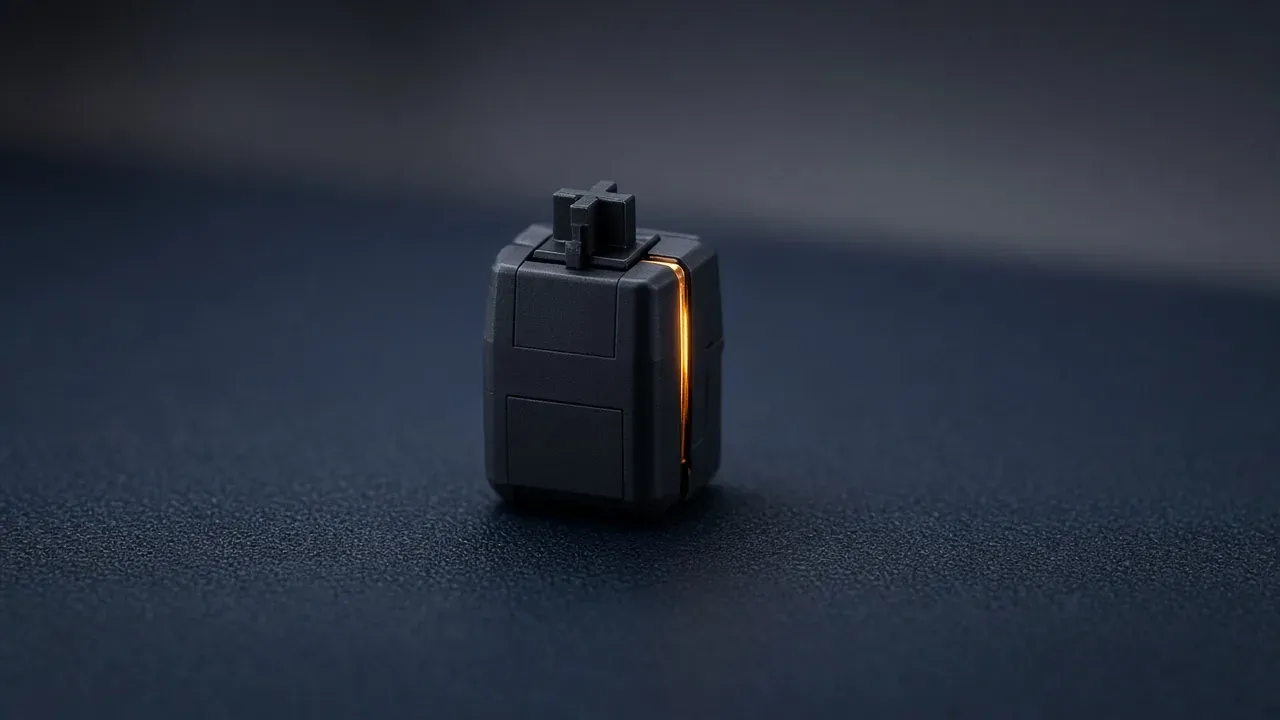
On this page
- Housings worth a look
- Official Cherry MX numbers
- What is inside the housing
- The feel is one line
- Grams and millimeters are different facts
- Words that sound like a new switch
- Housings that do not share a socket
- Pins, and what hot-swap actually promises
- What the switch leaves alone
- What to read before you buy a bag
As an Amazon Associate I earn from qualifying purchases. I earn a small commission from Amazon links, at no cost to you. See disclosure.
Ever wondered what’s actually under your keycaps? A mechanical keyboard switch is the housing under one key. A stem slides in it, a spring pushes that stem back up, and the keycap is only a cap pressed onto the stem. The key beside it has another housing. For full picks, see the best gaming keyboards. The switch is the part that feel comes from, and a listing has to name it before the layout talk means anything.
I play left-handed on UHJK. We’ll use Cherry MX numbers as the reference. More keyboard guides.
Housings worth a look
- The official linear ruler: Cherry MX Red. Cherry’s page: linear, 45 cN operating force, 2.0 mm pre-travel, 4.0 mm total travel, no click, over 100 million keystrokes, factory-lubricated. Cherry MX Red. Amazon search for Cherry MX Red switches
- A full-size board that prints MX Red: Corsair K70 RGB PRO (CH-9109410-NA). Official US $169.99. Tech specs: CHERRY MX Red, full-size, 104 keys, Full Key (NKRO), report rate up to 8,000 Hz, 8 MB onboard memory, detachable USB-C. Corsair K70 RGB PRO. Amazon search for K70 RGB PRO MX Red
- A TKL that lets you pick the feel: Logitech G PRO X TKL LIGHTSPEED. Official US $189.99 (listed against $219.99). LIGHTSPEED 2.4 GHz, tenkeyless, GX mechanical switches. Logitech G’s product page says you choose tactile, clicky, or linear. Logitech G. Amazon search for PRO X TKL LIGHTSPEED
The short version: read the feel, a weight with a unit, a distance in millimeters, and the socket. A color is a hint until those four are printed.
This listing names the feel and a hot-swap MX socket.
The listing names the feel, and the socket is hot-swap for an MX stem. The grams are the spring. The millimeters are the travel. Those switches can come out later.
Official Cherry MX numbers
Cherry’s switches overview sorts mechanical switches into three feels: linear, tactile, and clicky. MX STANDARD housings are 18.5 mm tall. MX LOW PROFILE housings are 11.9 mm. MX ULTRA LOW PROFILE housings are 3.5 mm. Those three heights do not share a socket. The examples below use Cherry’s MX2A pages.
| Cherry MX2A | Feel | Force | Pre-travel / travel | Keystrokes |
|---|---|---|---|---|
| Red | Linear, no click | 45 cN | 2.0 mm / 4.0 mm | Over 100 million |
| Black | Linear, no click | 60 cN | 2.0 mm / 4.0 mm | Over 100 million |
| Brown | Tactile, no click | 45 cN actuation, 55 cN operating | 2.0 mm / 4.0 mm | Over 100 million |
| Blue | Tactile and clicky | 50 cN actuation, 60 cN operating | 2.2 mm / 4.0 mm | Over 50 million |
| Speed Silver | Linear, no click | 45 cN | 1.2 mm / 3.4 mm | Over 100 million |
| Silent Red | Linear, silent | 45 cN | 1.9 mm / 3.7 mm | Over 50 million |
The table is the listing. Extra numbers Cherry prints on the same pages: MX Red initial 30 cN / final 100 cN; MX Black initial 30 cN / final 110 cN; MX Brown initial 30 cN / final 80 cN; MX Blue initial 25 cN. Brown and Blue print two force lines, actuation and operating. I leave those as two printed lines. Speed Silver is the same 45 cN as Red with a shorter trip. Silent Red is still linear, with patented damping. Silent is a damper, not a fourth feel.
cN is centinewton. People say grams. Cherry prints cN. Those numbers do not travel to another brand’s red, brown, or blue. Full pages: MX Red, MX Black, MX Brown, MX Blue, MX Speed Silver, MX Silent Red.
What is inside the housing
Cherry’s mechanical-technology page is the official picture. You press the cap. The cap moves the stem. The spring compresses. Two contact points that sat apart meet, the circuit closes, and the key counts. Let go and the spring returns the stem. The key can count before the stem hits the floor. That early count is the actuation point. Cherry’s MX pages call the contact Gold Crosspoint: triangular gold contacts that meet at right angles, described there as self-cleaning. The MX2A pages also print factory-applied lubricant. That is Cherry’s finish, not a bag I opened.
A membrane board has none of this under the cap. The keys share a rubber sheet. If the spec list never says mechanical, and never names a switch, you are still on that sheet. Pulling a keycap straight up shows a housing and a stem when the board is mechanical. If the cap does not lift, stop pulling.
The top of the housing keeps the stem on its rails. The bottom holds the contacts. Sound differences inside one family do not change the feel word, and they do not change the socket.
The feel is one line
Linear, tactile, and clicky are the three feels. Cherry’s own overview uses those three words. Linear travels smooth. Tactile adds a bump on the way down. Clicky adds that bump and a snap the room can hear. Cherry’s MX Brown page says the brown stem has a bulge on the TLS surface, and that bulge is the noticeable feedback. Cherry’s MX Blue page describes a two-part stem: after the tactile point, a white piece hits the blue stem and a click sound is triggered. The click is the product. It is not a side effect you can turn off in software.
Red, brown, and blue are the old color habit. Cherry’s own stem colors match that habit. Another company reuses the color on a different spring. “Gaming switch” is not a feel. “Speed” is not a feel. If the page names a color and never says linear, tactile, or clicky, the finger still does not know what it will meet.
The room still decides before the match does. A click carries past a headset. Linear is the usual match feel because nothing interrupts the press, and because it stays quieter next to a microphone. It is the shape of the press. A smooth key does not report more often than a bumpy one. UHJK still exists on a TKL and on a full-size board. I mouse on the left, so the keyboard sits to the right of the pad. A clicky full-size board is still a clicky board.
Grams and millimeters are different facts
Two numbers get printed as if they were one spec. The weight is how hard the spring pushes, in grams or in centinewtons. The distance is how far the stem moves, in millimeters. Actuation is the distance at which the contacts meet and the key counts. Bottom-out is the distance when the stem has nowhere left to go. Cherry often prints a second pair of weights beside those distances: initial force at the top, final force at the floor.
MX Red and MX Black share 2.0 mm / 4.0 mm. One is 45 cN. One is 60 cN. Same travel, two springs. MX Red and MX Speed Silver share 45 cN. One counts at 2.0 mm. One counts at 1.2 mm. Same weight, two distances. A listing that offers one number has not said which event it measured. A “45” with no unit might be grams at the contacts, grams at the bottom, or a millimeter someone forgot to label. Read the unit.
A lighter spring is easier to press, and easier to graze. It does not make the dongle speak more often. The K70 RGB PRO’s 8,000 Hz line is Corsair AXON, not MX Red. Keyboard latency is that report gap.
If a page prints both an actuation weight and a bottom-out weight, the gap is the rest of the press after the key has already counted. Cherry MX Red’s initial 30 cN and final 100 cN are that rise.
Words that sound like a new switch
A speed switch shortens the distances. Cherry’s official example is MX Speed Silver next to MX Red: 1.2 mm instead of 2.0 mm, 3.4 mm of travel instead of 4.0 mm. The contacts still report through Gold Crosspoint. The polling rate does not move because the stem is shorter. Rapid trigger is a different product. The page has to say Hall effect or magnetic, and it has to say rapid trigger.
A silent switch is a damper. Cherry’s MX Silent Red page calls it patented damping and a two-component stem. It can be a silent linear or a silent tactile. A damper does not remove a click. Silent gaming keyboard is that damper.
Optical is a light beam instead of the two contacts. Hall effect is a magnet in the stem. Both skip the metal leaf. Neither one is rapid trigger unless the listing says so. Seeing a cross-shaped stem does not mean the board is the Gold Crosspoint socket. Hall effect is the magnet page.
Housings that do not share a socket
The MX cross is the common keycap mount. The socket under the board is a separate question. Cherry’s technology page says standard MX switches can be replaced on a hot-swap board without soldering. A hot-swap board that says it takes MX switches is the one a normal MX housing plugs into.
Low profile is a shorter housing, a different travel, and a different footprint. Cherry’s own 11.9 mm low-profile family does not drop into an 18.5 mm MX STANDARD socket. A short travel on a full-height Speed Silver is still an MX-shaped housing. A low-profile switch is not that housing with the legs trimmed. Low-profile gaming keyboard is that height.
An optical board registers with its own sensor. A Hall effect board is the magnet and the sensor. A bag of MX Reds does not become a rapid-trigger board because the hot-swap marketing was vague. Capacitive dome boards, Alps-shaped stems, and buckling-spring boards are their own parts. They are not a replacement stem for a hot-swap MX board.
Pins, and what hot-swap actually promises
Hot-swap means the housing pulls out of a socket. A soldered switch is still a mechanical switch. It does not come out because you bought a puller. Cherry’s line is the useful one: on a hot-swap board, standard MX can come out without solder. A cycle count from a third-party guide is that guide’s rating. It is a reason to stop treating the socket as endless, not a test of the board on your desk.
MX-style switches mount as 5-pin or 3-pin. A 3-pin board has no holes for two extra plastic legs on a 5-pin switch. Those legs are guides. The circuit is the metal pins. Buy the pin count the board has. If a switch resists, it is misaligned. Forcing it is how the socket comes off with the switch.
The 1000 Hz setting, and the feel you picked, have to stay on the board when the software is closed. A switch does not store that. Onboard memory is the line for the settings.
What the switch leaves alone
The layout is still first. A full-size board and a 60 percent board can carry the same housing. I mouse on the left. UHJK already lives on the right side of a standard ANSI board. A full-size numpad sits away from the mouse, so it is clutter, not stolen pad. A 60% still has U, H, J, and K. It drops the F-row, which I care about more in WoW than in Overwatch. The Naga Left-Handed already holds consumables. TKL vs 60 vs full-size is that width.
N-key rollover is how many keys fit in one report. Cherry’s technology page treats that as a board property individual switches make possible. Polling is how often a report leaves. A 1000 Hz line is a 1 ms gap. The switch does not change that gap. Rapid trigger shortens the lift on a magnetic board that names the feature. A speed switch’s shorter actuation is a fixed point. RGB on the box does not light an opaque housing.
A prebuilt board often locks you to one brand of switch. The K70 RGB PRO MX Red listing is that lock. The PRO X TKL is the swap-the-GX case. A soldered board is the switch in the box. A color name is a weak spec until that board prints the feel and the weight it actually ships.
What to read before you buy a bag
Read the feel as linear, tactile, or clicky. Read a weight with a unit, and whether it is the actuation or the bottom. Read a distance in millimeters, and whether it is the count or the full travel. Read the socket: hot-swap or soldered, 3-pin or 5-pin, MX STANDARD or a named other family. A color, a “gaming” banner, and a cross on the stem are not an answer.
If the board is hot-swap and the socket is MX, a later bag can replace the housings. If it is soldered, the return window is the way back. If the page says Hall effect, optical, or low profile, stay inside that family.
I would not buy a clicky full-size as the only WoW board in a shared room. UHJK still fits. The F-row and the Naga grid do more for an Evoker bar than a snap on every key. The hour at home is the test.
Read feel, weight, millimeters, and socket. Cherry MX Red is the 45 cN / 2.0 mm ruler. More keyboard guides.
Common questions
What is a mechanical keyboard switch?
It's the individual mechanism under each key, with a stem and spring inside a housing. When you press the key, the switch registers the press; the keycap is a separate piece on top.
What should I look for in a keyboard switch?
Check four things: the feel (linear, tactile or clicky), the spring weight, the travel distance and whether it fits your keyboard's socket.
Are red, brown and blue the main switch types?
They're color names that usually mean linear (red), tactile (brown) and clicky (blue). Other brands reuse the colors with different springs, so read the feel listed on the product.
What are the specs of Cherry MX Red, Brown and Blue switches?
MX Red is linear with 45 cN actuation and 2.0 mm pre-travel. MX Brown is tactile at 45 cN with 2.0 mm pre-travel, and MX Blue is clicky at 50 cN with 2.2 mm pre-travel; all have 4.0 mm total travel.
Do lighter switches make a keyboard faster?
Not really. Lighter switches are easier to press but also easier to press by accident, and they don't change the polling rate. Shorter pre-travel, like the 1.2 mm on MX Speed Silver, registers a bit sooner.
Can I put any switch in a hot-swap keyboard?
Only switches that match the socket. Most hot-swap boards accept standard MX-style switches, but low-profile, optical and Hall effect boards need their own switch types.
What is Cherry MX Speed Silver?
It's Cherry's fastest full-height linear switch, with 45 cN actuation, 1.2 mm pre-travel and 3.4 mm total travel. The shorter pre-travel means keys register with less finger movement.
Is a Hall effect switch a mechanical switch?
Sort of. It's still one switch per key, but it uses a magnet and sensor instead of metal contacts, so it won't fit in a regular MX keyboard.
What is a silent mechanical switch?
It's a switch with built-in dampers that soften the sound when you press and release the key. Cherry MX Silent Red, for example, is a quiet linear switch with 45 cN actuation.
Keep reading
Hardware
What a 75 percent gaming keyboard is
Is a 75% keyboard right for gaming? What you keep, what you lose, and three boards worth buying.
October 20, 2026 · 10 min read
Hardware
What an FPS keyboard actually has to do
The best keyboards for FPS games in 2026: rapid trigger, size, and which features are actually worth paying for.
October 20, 2026 · 8 min read
Hardware
What an MMO keyboard is for
An MMO keyboard holds the spells that do not fit around movement keys: modifiers, number pad, a macro column, and the mouse thumb.
October 20, 2026 · 10 min read
Hardware
What a low profile gaming keyboard changes
A low profile gaming keyboard uses a shorter switch, so the keys and the case sit lower. The layout is still a separate choice.
October 20, 2026 · 9 min read