
Hardware
Based on the makers’ specs and my own testing where I say so.
How much VRAM do you need for gaming?
8 GB still runs esports games, but new releases want 12 GB and 16 GB to max out. Official game specs, TechSpot tests and Steam survey data in one guide.
Updated 9 min readYuval Eizik
- pc
On this page
Short answer: 8 GB of VRAM still runs esports games and most older titles. For new big releases, 12 GB is the sensible minimum on a card you buy today, and 16 GB is what lets you max out textures at 1440p and 4K for the next few years. Only 4K with full path tracing pushes past 16 GB.
I play on a desktop RTX 5080 with 16 GB, mostly Overwatch on a 1080p 240 Hz screen and World of Warcraft on a 1440p 155 Hz one. I didn’t run my own VRAM benchmarks for this guide. The numbers below come from official game requirements, TechSpot’s (Hardware Unboxed) 8 GB vs 16 GB testing and the Steam Hardware Survey, each linked where it’s used.
How much VRAM you need, by what you play
| What you play | VRAM that works | Why |
|---|---|---|
| Esports: CS2, Overwatch | 8 GB is plenty | CS2 asks for a 1 GB card; Overwatch recommends a GTX 1060 / GTX 1650 class GPU |
| World of Warcraft (Midnight) | 8 GB | Blizzard's recommended spec is a DirectX 12 GPU with 8 GB |
| New big games, 1080p | 8 GB minimum, 12 GB better | Indiana Jones lists 8 GB cards for 1080p Low; TechSpot saw 8 GB cards struggle at high settings |
| New big games, 1440p | 12 GB minimum, 16 GB to max out | Indiana Jones lists 12 GB cards for 1440p High; Forza Horizon 6 needs about 12 GB at its top preset |
| 4K, high to ultra | 16 GB | Indiana Jones lists an RTX 4080 16 GB for 4K Ultra |
| 4K with full path tracing | 24 GB | The full ray tracing 4K tier is listed with an RTX 4090 (24 GB) |
That’s also how TechSpot puts it after testing the two RTX 5060 Ti versions: a new card at about $300 should have at least 12 GB, and one at $400 or more should have 16 GB (TechSpot RTX 5060 Ti 8GB review, April 2025).
What VRAM actually does
VRAM is the graphics card’s own memory. It holds what the GPU needs right now: textures, the frames being drawn, geometry, and the extra data that ray tracing and frame generation use. It’s not the same as your system RAM. My PC has 32 GB of system memory and 16 GB on the card, and the two do different jobs.
Three settings move VRAM use the most:
- Texture quality. The biggest one. In TechSpot’s Forza Horizon 6 testing, lowering environment textures on the 8 GB RTX 5060 Ti raised its average FPS by 34% at the top preset (TechSpot, May 2026).
- Ray tracing. In Hogwarts Legacy at 1440p, the two RTX 5060 Ti versions averaged about the same FPS without ray tracing (the 8 GB card did show texture pop-in). With High ray tracing on, the 16 GB card was 62% faster on average and TechSpot called the 8 GB card “an unplayable stuttering mess”.
- Frame generation. TechSpot found it adds VRAM use too. In The Last of Us Part II at 1440p, turning it on dropped the 8 GB card’s 1% lows into single digits.
Resolution matters less than people think. Going from 1080p to 4K adds memory for the frame itself, but textures are the same size at every resolution. That’s why TechSpot saw The Last of Us Part II go over 9 GB at native 1080p on its Very High preset.
What happens when you run out
The game doesn’t refuse to start. It moves data into your system RAM over the PCIe bus, which is much slower, and you see it in one of four ways (all from TechSpot’s 15-game RTX 5060 Ti test):
- Stutter and bad 1% lows. At native 1080p Very High in The Last of Us Part II, the 16 GB card had 25% higher average FPS and 320% better 1% lows.
- Textures that don’t load. In Space Marine 2 with the 4K texture pack, the 8 GB card looked slightly faster on the FPS counter because it wasn’t loading the high-resolution textures at all. Same in Star Wars Jedi: Survivor, with missing textures.
- Crashes. Indiana Jones and the Great Circle crashed to desktop on the 8 GB card above the Medium preset.
- Lower FPS with smooth frame times. Forza Horizon 6 does this: the 8 GB card stays smooth but runs much slower. At 1440p on the top preset with Balanced DLSS, the 16 GB card averaged 61 FPS and the 8 GB card 33 FPS.
Two things make it worse. Cards with fewer PCIe lanes take a bigger hit when they spill over, since the RTX 5060 Ti uses 8 lanes and the RX 9060 XT uses all 16 (TechSpot PCIe test). And less system RAM leaves less room to spill into: with 16 GB of RAM instead of 32 GB, TechSpot measured the 8 GB card losing another 9% average FPS and 25% on its 1% lows in Forza Horizon 6.
To be fair to 8 GB cards, TechSpot also says 8 GB “is still enough for the majority of games today”, and some games in its test (Alan Wake 2, God of War Ragnarök, Black Myth: Wukong) ran close on both versions. The problem is the newest, heaviest games at high settings, and those are exactly the ones people buy a new card for.
What games officially ask for
| Game | Minimum | Recommended | Top tier |
|---|---|---|---|
| Counter-Strike 2 | 1 GB card, DirectX 11 | — | — |
| Overwatch | GTX 600 series / Radeon HD 7000 | GTX 1060 / GTX 1650, RX 6400, Arc A770 | — |
| World of Warcraft: Midnight | DirectX 12 GPU, 4 GB | DirectX 12 GPU, 8 GB (RTX 40, RDNA 3, Arc B) | — |
| Indiana Jones and the Great Circle | RTX 2060 Super 8 GB (1080p Low) | RTX 3080 Ti 12 GB (1440p High) | RTX 4080 16 GB / RX 7900 XT 20 GB (4K Ultra) |
Sources: CS2 on Steam, Overwatch system requirements, WoW Midnight system requirements, Indiana Jones PC requirements (Bethesda). Indiana Jones also needs a GPU with hardware ray tracing even at minimum. Its full ray tracing tiers ask for more memory again, up to an RTX 4090 with 24 GB at 4K (PCGamesN summary).
The gap between the two halves of that table is the whole story. The games I play the most were built to run on almost anything. Overwatch, the game I hit Master 1 on as Zarya, doesn’t even list a VRAM amount on its official page. If competitive shooters and WoW arenas or battlegrounds are all you play, a big frame buffer isn’t where your money should go. Frame rate and a fast monitor matter far more there.
What other players have
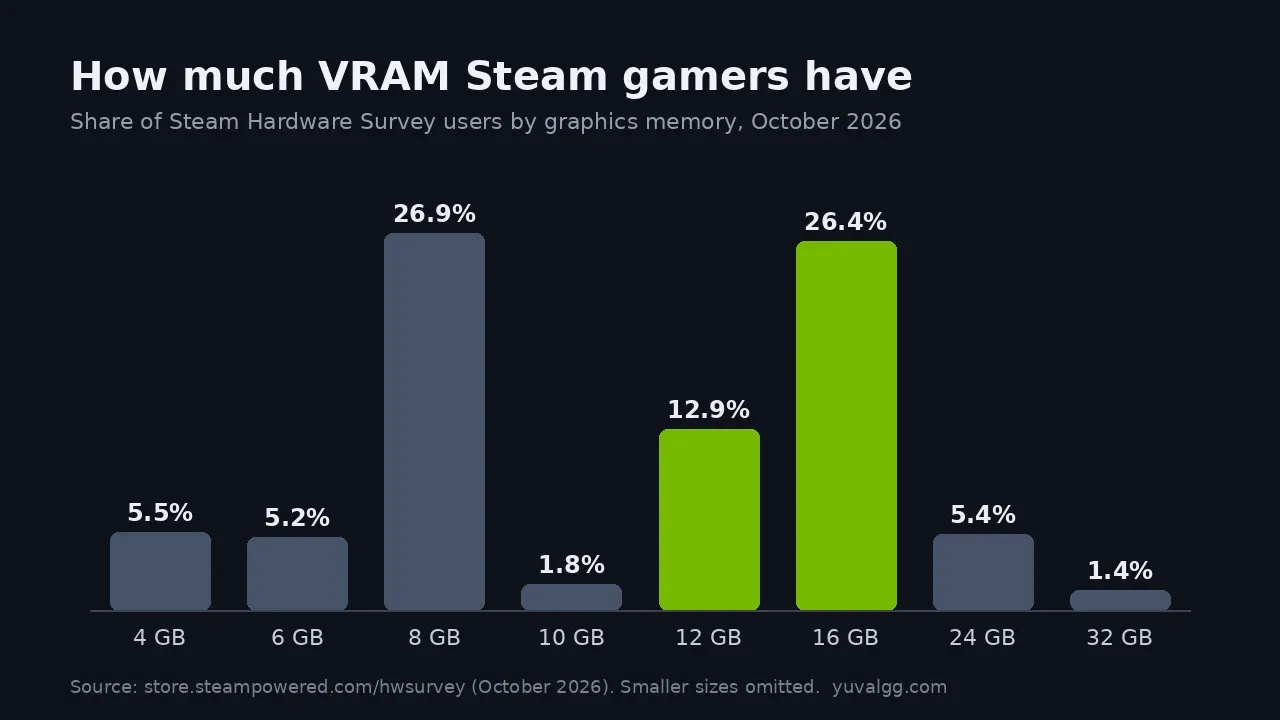
The Steam Hardware Survey for October 2026 shows the split clearly. That’s the chart at the top of this page:
- 8 GB: 26.9% of Steam users, still the most common size
- 16 GB: 26.4%, nearly level with 8 GB
- 12 GB: 12.9%
- 24 GB: 5.4%
- 4 GB and 6 GB: 5.5% and 5.2%
Half of Steam users (50.2%) still play on 1920 × 1080, and 21.8% on 2560 × 1440. Developers build for what people own, which is why 8 GB still gets a working “Low” or “Medium” preset in new games. But more and more players are on 12 GB or more.
VRAM on today’s graphics cards
Launch prices and memory from NVIDIA, AMD and Intel (also in the GPU compare tool, with sources and check dates):
| Card | VRAM | Launch price |
|---|---|---|
| Intel Arc B580 | 12 GB GDDR6 | $249 |
| RTX 5060 | 8 GB GDDR7 | $299 |
| RX 9060 XT | 8 GB or 16 GB GDDR6 | $299 / $349 |
| RTX 5060 Ti | 8 GB or 16 GB GDDR7 | $379 / $429 |
| RTX 5070 | 12 GB GDDR7 | $549 |
| RX 9070 | 16 GB GDDR6 | $549 |
| RX 9070 XT | 16 GB GDDR6 | $599 |
| RTX 5070 Ti | 16 GB GDDR7 | $749 |
| RTX 5080 | 16 GB GDDR7 | $999 |
| RTX 5090 | 32 GB GDDR7 | $1,999 |
Sources: NVIDIA RTX 5060 family, AMD Radeon RX 9060 XT, Intel Arc B580. Street prices move. TechSpot noted in May 2026 that 16 GB RTX 5060 Ti cards were selling for about 53% more than the 8 GB version, against a 13% gap at launch, so check today’s price for both versions.
Watch the name. The RTX 5060 Ti and RX 9060 XT come in 8 GB and 16 GB versions with the same name on the box. TechSpot calls the 8 GB 5060 Ti “a serious trap” for exactly this reason. Read the memory line on the listing before you pay.
Where that leaves the cards I’ve covered:
- RTX 5070 (12 GB) vs RTX 5070 Ti (16 GB): the VRAM gap is one of the main differences. The full breakdown is in RTX 5070 vs RTX 5070 Ti.
- RTX 5070 (12 GB) vs RX 9070 XT (16 GB): TechSpot saw the 5070 hit its memory limit in Mafia: The Old Country at Epic and Star Wars Outlaws at 4K. See RTX 5070 vs RX 9070 XT.
- RTX 5070 Ti vs RX 9070 XT (16 GB each): VRAM is a tie, so price, ray tracing and power decide it. See RTX 5070 Ti vs RX 9070 XT.
- Shopping for 1440p: every current card from the Arc B580 (12 GB) to the RTX 5080 (16 GB), with prices and frame rates, is in best GPU for 1440p.
- RTX 5080 (16 GB): the card I play on, and the 16 GB TechSpot names as the no-compromise target. Build and power notes: RTX 5080 gaming PC.
- RTX 5090 (32 GB): more than any game here asks for. It makes sense for 4K path tracing and creative work. See the RTX 5090 page.
How to check how much VRAM a game uses
- Open Task Manager (Ctrl + Shift + Esc) → Performance → GPU. Dedicated GPU memory shows the card’s VRAM in use; Shared GPU memory is system RAM the GPU is borrowing.
- Play the game for a while in a busy area, not just the menu. VRAM use climbs over a session, and TechSpot’s 12-minute Forza run hurt the 8 GB card more than a short benchmark did.
- If dedicated memory sits at your card’s limit and shared memory starts climbing, turn texture quality down one step first, then ray tracing. Watch your FPS counter and 1% lows, not just the average.
- Many games show a VRAM estimate in their graphics menu. Treat it as a rough guide, since actual use moves with the scene.
If you’re not short on VRAM, lowering textures won’t help. TechSpot saw no FPS gain from lower textures on the 16 GB card. For other ways to get frames back, see how to increase FPS and what DLSS does.
Bottom line
- Esports and WoW only: 8 GB meets every official requirement. Spend on GPU speed and your monitor instead.
- New games at 1080p or 1440p: buy 12 GB at minimum, 16 GB if you want maxed textures to last.
- 4K: 16 GB, and more only if you want full path tracing.
More cards and guides are on the graphics cards hub, and you can put any two cards side by side in the GPU compare tool.
Common questions
Is 8 GB of VRAM enough for gaming in 2026?
For esports and older games, yes: CS2 asks for a 1 GB card, Overwatch recommends a GTX 1060 or GTX 1650 class GPU, and WoW Midnight recommends 8 GB. For new big releases it is the floor, not the target. TechSpot's tests of the 8 GB and 16 GB RTX 5060 Ti found the 8 GB card stuttering, losing textures or crashing at high settings in many recent games, even at 1080p.
Is 12 GB of VRAM enough for 1440p?
For most games at high settings, yes. Indiana Jones and the Great Circle lists 12 GB cards for its 1440p High preset, and TechSpot found Forza Horizon 6 needs about 12 GB for its top preset. TechSpot's advice is 12 GB as the minimum for a new card and 16 GB if you want maxed settings over the card's whole life.
Is 16 GB of VRAM enough for 4K?
For most games, yes. Indiana Jones and the Great Circle lists an RTX 4080 16 GB for native 4K on its Ultra preset. Full path tracing at 4K is the exception: that mode is listed with an RTX 4090 and its 24 GB.
Does more VRAM give you more FPS?
Only when you were running out. Extra VRAM does nothing if the game already fits. TechSpot found that lowering textures on the 16 GB RTX 5060 Ti in Forza Horizon 6 gave no FPS gain, because that card already had enough memory. When a game does not fit, more VRAM fixes stutter, bad 1% lows and blurry textures.
Can I add more VRAM to my graphics card?
No. VRAM is soldered onto the card. The 'shared GPU memory' Windows shows is your system RAM, which is much slower to reach. When a game spills into it, frame rates and 1% lows drop. The only fix is lowering settings, mostly textures, or buying a card with more memory.
How much VRAM does your graphics card have?
16 GB. I play on a desktop RTX 5080 with 16 GB of GDDR7, next to a Ryzen 9 9950X3D2 and 32 GB of DDR5-6000, on a 1080p 240 Hz and a 1440p 155 Hz monitor. The test numbers on this page come from TechSpot and official game requirements, not from my own benchmarks.
Keep reading
Hardware
Best GPU for 1440p gaming (2026)
The RX 9070 XT matches the RTX 5070 Ti at 1440p for far less. Picks by budget with Tom's Hardware fps, TechSpot prices and what 144-240 Hz needs.
November 17, 2026 · 7 min read
Hardware
RTX 5070 vs RX 9070 XT (2026): which one to buy
RTX 5070 vs RX 9070 XT: TechSpot's 52-game test has the 9070 XT 24% faster at 1440p with 16 GB vs 12 GB. Where the 5070 still wins, plus prices.
November 15, 2026 · 6 min read
Hardware
RTX 5070 Ti vs RX 9070 XT (2026): which one to buy
RTX 5070 Ti vs RX 9070 XT: both 16 GB, near-tied in TechSpot's 52-game test, 5070 Ti ahead in heavy ray tracing, 9070 XT far cheaper. Researched.
November 12, 2026 · 5 min read
Hardware
RTX 5070 vs RTX 5070 Ti (2026): which one to buy
RTX 5070 vs RTX 5070 Ti on NVIDIA specs: 12 GB vs 16 GB GDDR7, 250 W vs 300 W, from $549 vs $749. Researched, not hands-on.
November 5, 2026 · 4 min read
Comments
No comments yet. Be the first to share what you think.