
Hardware
Based on the makers’ specs and my own testing where I say so.
Air cooler vs liquid cooler
An air cooler and a sealed liquid cooler both take heat off the CPU. Buy liquid when the tower will not fit, or the chip is still slowing down.
Updated 11 min readYuval Eizik
- pc
- cooling
This article has affiliate links. If you buy through them, I may earn a small commission at no cost to you. Prices move fast, so check the store for today's price before you buy.
Read the disclosure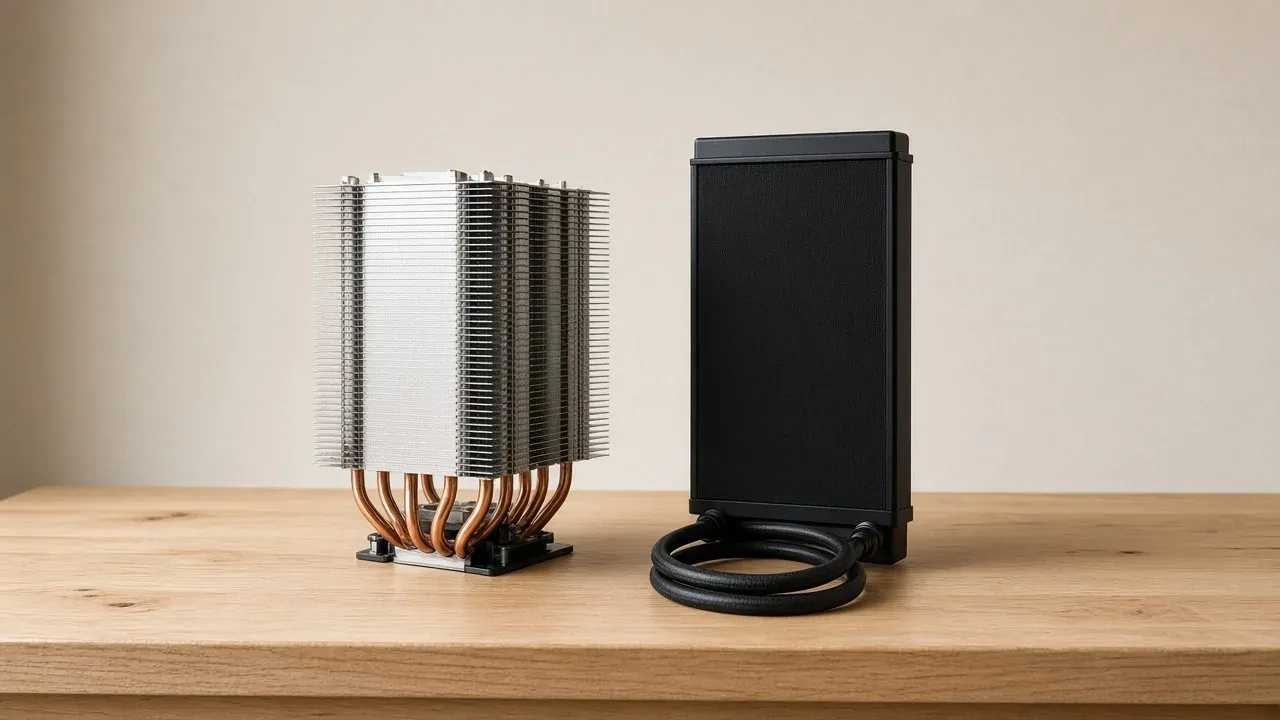
On this page
As an Amazon Associate I earn from qualifying purchases. I earn a small commission from Amazon links, at no cost to you. See disclosure.
Air or liquid? It’s one of the first questions in any new build, and the good news is that both do the same job. They take heat off the chip and hand it to the air. The card draws the frames. The cooler only has to keep the chip from slowing itself down while that card works.
I run an AMD Ryzen 9 9950X3D2 next to an RTX 5080. AMD rates the 9950X3D at 170 W default TDP, with Thermal Solution (PIB) Not Included, and a liquid cooler for optimal performance. The 9800X3D page says the same about the box: no cooler inside, liquid recommended, 120 W. A tower and a sealed radiator can both be adequate on a chip like that. More PC build guides.
Coolers worth a look
- Dual-tower air, AM5: Noctua NH-D15 G2. Official: AM5 / AM4 and Intel LGA1851 / 1700 / 1200 / 115x, 168 mm tall with fans, 150 × 152 mm with fans, 1525 g, copper base, eight heatpipes, two NF-A14x25r G2 PWM fans at 1500 RPM / 24.8 dB(A) (1250 RPM / 19.7 dB(A) on the adapters), 6-year warranty, NT-H2 in the box. Noctua says the extra heatpipes help most at heat-loads such as 250 W and beyond, and that the G2 rivals many AIOs. It does not print a TDP rating. Noctua NH-D15 G2. Amazon search for NH-D15 G2
- 360 mm AIO with a VRM fan: ARCTIC Liquid Freezer III Pro 360. Official: AM5 / AM4 and LGA1851 / 1700, radiator 398 × 120 × 38 mm, 450 mm tubes, copper micro-skived plate, pump 800–2800 RPM, three P12 Pro fans 600–3000 RPM / 77 CFM, PWM VRM fan 400–2500 RPM, MX-6, 6-year warranty. Arctic asks for 63 mm of block clearance. ARCTIC Liquid Freezer III Pro 360. Amazon search for Liquid Freezer III Pro 360
- 360 mm AIO with an LCD cap: NZXT Kraken 360 (RL-KN360-B1). Official US shop $179.99. 1.54-inch 240×240 LCD, Asetek pump 800–2,800 ± 300 RPM, radiator 121 × 394 × 27 mm on the product page, 400 mm tubes, three F120P fans 500–1,800 RPM, AM5 / AM4, CAM for the screen and fan curve, 6-year warranty. NZXT Kraken 360. Amazon search for Kraken 360
The short version: keep the cooler you have if the panel closes and the chip holds its speed. Move to liquid when the tower will not fit, or when the chip is still slowing down after the case can breathe.
Which limit you have
Which limit the cooler is hitting
The tower fits, and the chip is holding its speed. Leave the cooler. Air or liquid, it is already enough.
Start with the limit you can see. A new radiator does not help a chip that is already holding its speed, and a taller tower does not help a panel that cannot close. The cooler in the box is enough until one of those two limits shows up. On current X3D boxed chips, that cooler is often missing, so the first buy is still “enough,” not “best.”
| Tower air | Sealed AIO | Custom loop | |
|---|---|---|---|
| What moves the heat | Heatpipes into fins over the socket | Coolant through tubes to a radiator | A loop you fill and maintain |
| Where the bulk sits | Height over the board | A 240 / 280 / 360 mount the case lists | Radiators, a reservoir, and more tubes |
| What usually fails | A fan you can replace | A sealed pump, which means a new unit | Whatever you assembled |
| Liquid that can leak | None | Uncommon on a sealed unit | Yours to fill and to spill |
| Heat in the case | Dumped into the case air, then exhausted | Can leave through a radiator set as exhaust | Same idea, more parts |
| Example | Noctua NH-D15 G2, 168 mm | ARCTIC Liquid Freezer III Pro 360, or NZXT Kraken 360 | Skip it |
What each one moves
Intel’s page on liquid cooling versus air cooling is the maker write-up I will stick to for the shared start. Heat reaches the metal lid of the chip, the integrated heat spreader. Paste carries it into the cooler’s base. An air cooler sends it up heatpipes into fins, and a fan blows it off. A liquid cooler sends it through coolant and tubes to a radiator, and that radiator’s fans blow it off.
The page quotes Mark Gallina, a thermal architect at Intel: during normal operation the transistors convert electrical energy into heat, and if an efficient path does not exist the CPU exceeds its safe temperature. Gallina’s second line is why people buy liquid: it “efficiently distributes heat over more convection surface area (radiator) than pure conduction, allowing for reduced fan speeds (better acoustics) or higher total power.”
A custom loop is a different build. Intel splits the liquid side the same way: an all-in-one is the sealed pump, tubes, and radiator. A custom loop can take a graphics card into the same circuit. This guide compares that sealed unit with a tower of fins. The warm air still leaves on the path the case can give it. A radiator set as exhaust sends the chip’s heat out. A tower leaves that heat in the case air first. Case airflow is the box around either one.
Where the measured gap stays small
Ismar Hrnjicevic, writing for How-To Geek on 3 January 2024, says a good air cooler and a good AIO land close. A liquid cooler at the top of the range can lead, because it keeps carrying heat to the radiator, and the chip takes longer to heat the whole loop.
Kunal Khullar, writing for Tom’s Hardware on 29 October 2024, says the gap between a strong air cooler and an ordinary liquid cooler has narrowed. A small radiator is not automatically cooler or quieter than a modern tower.
Michael Crider, writing for PCWorld on 11 June 2025, gives liquid a small edge in a high-end setup, and a solid air cooler the win over a cheap or poorly mounted liquid unit. For the money he picks air: a pump, coolant, and a radiator are more parts than metal and a fan.
The three pages do not print the same gap. Watch the chip’s speed in the game you play. If the speed holds, the cooler you have has finished the job.
Noise, where the pages split
Intel’s page says liquid tends to be quieter, because the pump is small and the radiator fans can turn slowly. Hrnjicevic says size and the quality of the fan or the pump matter more than the type, and that a pump can hum when air sits in the coolant. Crider says liquid is generally quieter, and a noisy pump can still be a nuisance.
Noctua prints 24.8 dB(A) at full speed and 19.7 dB(A) on the adapters. NZXT prints 17.9–30.6 dBA for each F120P. Arctic does not print a dB figure on the Pro 360 page I opened. Those are maker numbers for those fans, not a contest I ran in one room. Listen after the curve is set, with the panel closed. Arctic offers one PWM cable that ties the pump, VRM fan, and radiator fans together, or a splitter that runs them apart. NZXT puts the pump and fans on a breakout cable and asks for CAM if you want a zero-RPM fan curve. The motherboard manual names the header.
What can fail
Hrnjicevic writes that an air cooler lasts as long as the mount still fits. A failed fan can be replaced. The pump in a liquid cooler is sealed, so a dead pump means a new unit. He says leaks are rare. Khullar says the same pair: rare leak risk, and a worn pump that usually takes the whole AIO with it. Sarfraz Khan, writing for Laptop Mag on 12 March 2025, swapped a liquid cooler for a tower after a leak in his own machine. That is one builder, not a rate.
The three named units all print six years. A fan on the G2 is a part you can buy again. The sealed pump on the Arctic or the Kraken is not. Arctic’s Pro 360 also puts a small PWM fan on the block to blow across the voltage regulators. A tower fan already washes those stages if it hangs over them. A liquid block that sits low does not, unless the maker added that extra fan.
The fit the case has to allow
A tower is tall. The case lists a maximum CPU-cooler height, and the side panel has to close. Memory under the fins is the second number. Hrnjicevic calls a large tower the awkward install, because the screws are hard to reach. Khullar lists that bulk as the reason a compact case pushes you toward liquid. Intel says the same in fewer words: a small case may want a low tower or a small radiator.
The G2 is 168 mm with its fans. If the case prints 160 mm, that tower is not the part. Noctua also says the G2’s offset stack is meant to clear the top PCIe x16 slot on most current boards. Confirm that on the board you have.
A liquid cooler moves the fins onto a radiator the case has to list by position and by size. A 360 needs three 120 mm fans of space, plus the radiator’s own thickness. Arctic’s Pro 360 radiator is 38 mm thick before the fans. NZXT’s Kraken 360 shop page prints 27 mm. Thick fans, tall memory, a front radiator in front of a long 5080, and a second radiator can cancel a size printed on the front of the listing. Arctic asks for 63 mm of clearance around the block. The tubes need a route that does not kink. 450 mm on the Arctic, 400 mm on the Kraken. A 240 mm AIO is still liquid. It is not the same radiator as a 360.
AMD’s boxed note, and the 170 W line
I play on the 9950X3D2. I run an AIO on my 9950X3D2. The official pages I can cite are the ones AMD already printed.
The Ryzen 7 9800X3D page: 8 cores / 16 threads, 120 W, Thermal Solution (PIB) Not Included, liquid cooler recommended for optimal performance, 95°C Tjmax, socket AM5. The Ryzen 9 9950X3D page: 16 cores / 32 threads, 170 W, the same empty-box line, the same liquid recommendation, the same 95°C. X3D chips and which CPU to buy cover which chip to buy. Here the only question is whether the heat leaves.
“Liquid recommended” is AMD’s optimal line. It is not a ban on a 168 mm tower that already holds the clocks, and it is not a reason to hang a 240 mm radiator in a case that cannot feed it. The test is still a closed panel and a chip holding its speed.
What the listing has to show
Ignore the word best until the page states these:
- The cooler is one the chip’s maker says is enough, or it is the one in the box. On the 9800X3D and the 9950X3D, the box is empty.
- The socket. AM5 is the one on those chips. The three named coolers list it.
- For a tower: the height, and that the side panel closes. The memory clearance, if the fins overhang the slots.
- For a liquid unit: the radiator size, the thickness with fans, the mount the case lists, and a route for the tubes.
- The pump header the motherboard manual names, if the cooler is liquid.
- The warranty the maker prints on the pump. A fan you can replace is the air cooler’s version of that line.
- The chip’s speed in the game you play, with the panel closed. A speed that holds means the cooler has done the job.
A named cooler on a list is still a listing until it fits and the chip holds its speed.
How to choose
If the panel closes and the chip holds its boost in the scene you already play, keep the cooler. Spend the money on the card or on a case that can breathe. If the tower hits the glass, or the memory will not seat, a radiator on a mount the case already lists is the move. A 360 in a box that only has a 240 is not a 360.
If the path is already clear and the chip is still slowing itself down, a larger cooler is next: a dual-tower the case can hold, or a 360 the case can mount. Intel’s page points liquid at long, hot work and at people who want the fans slower. PCWorld still picks air for the money. I pick the one that fits and holds the clocks.
Do not buy a custom loop because an AIO exists. Do not leave the plastic film on the base. Arctic’s page says a cross of MX-6 is enough because the plate spreads it. A custom PC is still a seating problem before it is a shopping problem.
A radiator as intake on a dusty floor is a filter the fins did not ask to be. A tower in a sealed cupboard is a chip breathing its own exhaust. A 240 hanging in front of a long card, with the tubes kinked, is a fit problem wearing a liquid badge. AMD prints 95°C on those two X3D pages. A number under that, with the clocks holding, is finished. A pretty number while the clocks drop is not.
The decision
If the tower fits and the chip holds its speed, keep it. If the tower will not fit, or the chip is still slowing down after the case can breathe, move the fins to a radiator the case lists. The PC build guides is the rest of the box.
Common questions
Is a liquid cooler better than an air cooler?
Not by much. A good air cooler and a good AIO perform close to each other on most gaming CPUs. Liquid is mostly worth it for a hot, high-end chip or when your case fits a radiator better than a tall tower cooler.
Does a liquid cooler increase FPS?
Only if your CPU is currently slowing down because it's too hot. If it already holds its boost clocks, lower temperatures won't add frames.
How long does an AIO cooler last?
Many AIOs come with a six-year warranty, which is a good guide to how long they're built to run. When the sealed pump dies, you replace the whole cooler.
Do I need a liquid cooler for a Ryzen X3D CPU?
Not necessarily. AMD recommends liquid cooling for best performance on the 9800X3D and 9950X3D, but a strong air cooler handles them well for gaming.
Keep reading
Hardware
What gaming PC cooling has to move
Gaming PC cooling is the path heat takes off the chip, off the card, and out of the case. A hot chip that slows down is a slower computer.
October 20, 2026 · 11 min read
Hardware
AMD X3D gaming CPU (2026): which chip, and when the cache is the buy
A 2026 guide to AMD Ryzen X3D CPUs. Official specs for the 9800X3D, 7800X3D, and 9950X3D, plus when 3D V-Cache actually adds frames next to an RTX 5080.
October 20, 2026 · 7 min read
Hardware
Airflow PC case (2026): mesh first, then GPU length — H5 Flow, Lancool 216, Pop Air
The best airflow PC cases in 2026, and how to pick one that keeps your GPU cool and quiet.
October 20, 2026 · 4 min read
Hardware
What a gaming laptop's cooling can do
Gaming laptop overheating? The fixes that actually lower temps, no teardown needed.
October 20, 2026 · 9 min read