
Hardware
Based on the makers’ specs and my own testing where I say so.
What a gaming laptop's cooling can do
Gaming laptop overheating? The fixes that actually lower temps, no teardown needed.
Updated 9 min readYuval Eizik
- pc
- laptop
This article has affiliate links. If you buy through them, I may earn a small commission at no cost to you. Prices move fast, so check the store for today's price before you buy.
Read the disclosure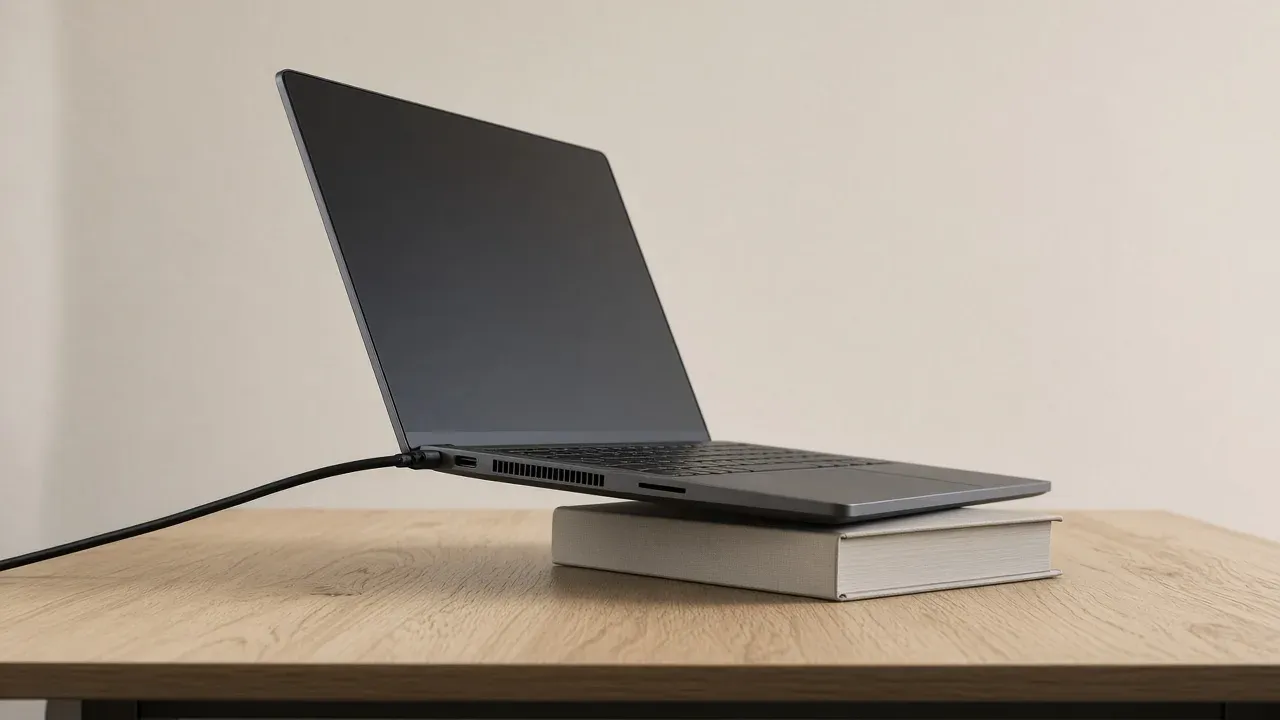
On this page
As an Amazon Associate I earn from qualifying purchases. I earn a small commission from Amazon links, at no cost to you. See disclosure.
Is your gaming laptop running hot and loud? Unlike a desktop, a gaming laptop makes its heat in a box that does not come apart. The fans, the pipes, and the vents were built with the chip. Clearing those vents, and stopping the chip from drawing frames the screen cannot show, is the cooling you can actually change. The same chip name in a desktop tower is a different computer, with a cooler you can remove. This one stays sealed.
I used to carry a Razer Blade 15. These are the fixes that help most.
When it got hot
When the laptop got hot
Just sat downTen minutes inVents already clear
It is still early. Give the vents a hard surface and the exhaust a clear path. The charger stays in.
Start with what you can see. A new pad does not open a vent that a blanket is covering, and paste does not fix a laptop that was fine until it sat on a bed. The charger stays in the side. On battery the machine cuts its own power, and the frame rate falls with it.
Chassis worth a look
- Vapor chamber + MUX + a printed wattage: ROG Strix SCAR 16 (2025) G635. Official ASUS US page: end-to-end vapor chamber, sandwiched heatsink, Tri-Fan, Conductonaut Extreme on CPU and GPU, MUX switch with NVIDIA Advanced Optimus, up to GeForce RTX 5090 Laptop GPU at up to 175 W max TGP, Intel Core Ultra 9 275HX at up to 80 W TDP. ASUS Store starting price $4,299.99. Amazon search for SCAR 16 2025
- Vapor chamber + a printed package power: Razer Blade 18. Official: vapor chamber, triple-fan cooling, thermal hood, up to 280 W total package power. Razer’s cooling blog calls the chamber a sealed copper structure that spreads heat across a wide area. Amazon search for Blade 18
- Named Coldfront vapor + MUX: Lenovo Legion Pro 7i Gen 10. Official datasheet: Legion Coldfront: Vapor with Integrated Hyper Chamber, 250 W vapor chamber. A US PSREF config (83F50018US) prints RTX 5090 Laptop GPU, TGP 175 W. Amazon search for Legion Pro 7i
The short version: the cooler is the chassis. You change the air under it and the frames you stop asking it to draw.
| Word on the page | What it tells you | Example |
|---|---|---|
| Vapor chamber | A flat sealed spreader, not a pipe you can swap | SCAR 16 2025, Blade 18, Legion Pro 7i Coldfront Vapor |
| TGP / package power | How many watts the maker will let the GPU, or the box, spend | SCAR 16: up to 175 W max TGP; Blade 18: up to 280 W TPP |
| MUX / Advanced Optimus | Who drives the panel. Direct GPU path, more power | SCAR 16 lists both. NVIDIA documents the three display modes |
| A cooling pad | Extra air under the intake, not a new heat pipe | ASUS and Razer list a stand or a pad after a clear desk |
| New paste | A last-resort joint. On a Blade, Razer says it voids warranty | Service, not a first Saturday |
The surface under it
Razer’s cooling blog ranks a hard, flat surface as the change that costs nothing. A desk, a book, or a sturdy stand keeps the intake clear and gives warm exhaust room to leave. Soft surfaces — pillows, blankets, beds, couches — block vents and trap heat under the chassis. If the machine pulls air from the bottom, even a small lift at the rear helps.
Never use it on a bed or couch, and keep a gap around the vents. Ambient air should stay between 5 °C and 35 °C (41–95 °F), per ASUS.
Close apps you are not using. A cooling pad can help if it fits the laptop.
The exhaust needs the same kindness. Dust on the blades and the fins closes the path slowly enough that you notice it only after the machine is already hot. Hold the machine upside down and use a can of compressed air so you are blowing dust out rather than deeper in. Keep the side vents off the wall, and off a pile of cables. A hotter room arrives as hotter air at the intake. Give the intake the open air in the room you have.
The power it is allowed to spend
The heat is the electricity the chip is using. A laptop GPU is not the desktop card with the same number. NVIDIA prints a TGP, total graphics power, for each laptop SKU. Dynamic Boost can shift extra watts from the CPU to the GPU. ASUS publishes those pairs. The 2025 SCAR 16 page I opened lists up to 175 W max TGP on the top GPU. Razer’s Blade 14 FAQ, a different thin chassis, prints a 40-series example of 115 W base plus 25 W Dynamic Boost for 140 W TGP. The Blade 18 page prints up to 280 W as a total package. Those are three different boxes. The wattage on your listing is the budget the fans were built for.
Razer’s Blade support page says newer processors are built to run warmer, and that you should read the maximum operating temperature on the AMD or Intel page for that chip. It also says a short 95 °C spike that then falls is common, and that the average can still be fine. The aluminum chassis spreads heat, so the palm rest can feel hot while the chips are doing the job they were rated for. A colder number, while the clocks hold, is not more frames.
When the frame rate was fine in a menu and worse ten minutes into a match, the chassis is the limit. Cap near the refresh rate so the chip stops drawing pictures the screen cannot show. A 240 Hz panel still shows about 80 pictures if the GPU is making 80. The extra frames are heat. I do this on the desktop when I want the tower quieter. On a laptop it is the first software change that does not open the bottom.
The maker’s app usually has a louder mode that raises clocks for a small peak — Armoury Crate Turbo, Synapse performance, Legion’s extreme-style labels. That mode spends the wattage on the spec sheet. It is not free cooling. The charger stays connected while you play. I treated the Blade 15 the same way: plug it in for a match.
Close the programs you are not using. Razer’s blog lists browsers, cloud sync, capture tools, chat, launchers, and background updates as heat the game did not ask for. Task Manager is the check.
A MUX is not a fan
A MUX switch is a display path, not a heatsink. ASUS’s MUX explainer says a typical laptop GPU draws a frame, then hands it to the iGPU, then the panel. That saves battery, because the discrete chip can sleep. It also adds a copy. A MUX lets the discrete GPU drive the panel directly. ASUS says that can raise frame rate — they print an average of 9% in their testing, and more than 30% in Rainbow Six Siege — and cut latency. Ultimate mode on a 2022-and-later ROG machine uses that path, draws more power, and needs a reboot. Eco mode turns the discrete GPU off.
NVIDIA Advanced Optimus is the version that can flip that path without the reboot. NVIDIA’s support note lists three display modes: Automatic, Optimus (iGPU drives the panel), and NVIDIA GPU only. Direct GPU output is also how some laptop panels get G-SYNC. VRR is that refresh follow. It does not cool the chips.
I would use the direct-GPU mode when the charger is in and I want the click. I would not turn it on to make the fans quieter. More frames through a shorter path is more work for the same box.
What a vapor chamber is
ASUS, Razer, and Lenovo all print vapor chamber on the chassis above. Razer’s explainer is the plain one. A heat pipe is a narrow tube that carries heat along one path. A vapor chamber is a flat, sealed copper structure that spreads heat across a wide area. Liquid inside turns to vapor, moves, condenses, and comes back. The point is fewer hot spots on a thin board.
ASUS describes the 2025 SCAR 16 chamber as layered to match the motherboard, pushed to the rear, and sandwiched between upper and lower heatsinks. They also print up to 15 °C cooler CPU temperatures against their previous compound, as an internal ASUS test. That is ASUS’s comparison, not a reading from a Blade 15. Lenovo’s Coldfront Vapor page-language is a 250 W chamber plus a hyper chamber path for the air. The word on the listing is the fact. “Gaming cooling” without that word is an adjective.
You cannot swap that chamber for a tower cooler. The pipes, the fans, and the size of the chassis decide how much heat can leave. Desktops are different: see PC case airflow.
A lift, and a pad with its own fans
The pages agree on air under the chassis. They do not pick one branded box of extra fans. Razer lists a laptop cooler or a stand. ASUS lists a cooling pad or a stand so the underside is not flat against the desk. Lenovo says a pad can be used if it fits.
So the first lift is a book or a stand that opens the intake and does not blow against it. A pad is the next try when the vents are already clear, the charger is in, and the chip is still slowing down. A pad at full speed can be louder than the laptop. No pad stays the one.
Dust, paste, and the limit of the box
Razer puts do not replace the thermal paste in bold on the Blade temperature article. Doing it voids the warranty. If the vents are clear, the cap is on, and the machine is still slowing down, service is the next step, not a Saturday with a syringe. ASUS’s FAQ ends the same way: if the heat remains after the surface, the vents, and the stand, keep troubleshooting or get it serviced.
Don’t start with a voltage change. Razer tells Blade owners who have an overclock toggle to disable it in Synapse. That is the official direction: stop asking the chip for extra watts before you hunt for a BIOS slider. Undervolt menus differ by model and can make the machine unstable. The surface, the vents, the charger, and the cap come first.
What you can check without a teardown
Ignore a new laptop until these are true on the one you have:
- It sits on a hard surface. A bed, a blanket, or a lap is covering the intake.
- The exhaust is not against a wall, and the vents are not full of dust.
- The charger is in.
- The frame rate is capped near the refresh rate if it falls after the match has been running.
- Other programs are closed.
- A lift under the chassis comes before a fan pad, and a fan pad comes before paste.
- The maker’s performance mode matches a session you plugged in for. Quiet modes cut watts on purpose.
A 1% low that collapses ten minutes in, while the average looked fine in the menu, is the chassis telling you it is done. Replay the same moment after the cap and the lift. If the speed already holds, the box has done its job. A colder palm rest is comfort. It is not more frames.
The cooling you can change is the air under the laptop and the frames you stop asking it to draw. When the speed already holds, the chassis has done its job. More PC build guides.
Common questions
How do I keep my gaming laptop cool?
Use it on a hard, flat surface, keep the vents clear, and raise the back slightly to help airflow. Capping your FPS near your screen's refresh rate also cuts heat a lot.
Do laptop cooling pads work?
A little. Raising the back of the laptop helps the most, and the fans on a pad add a few degrees of extra cooling at best.
What temperature is too hot for a gaming laptop?
Modern laptop CPUs and GPUs often run in the 80s to 90s °C under load, and short spikes to around 95 °C are normal. If your FPS drops sharply after a few minutes, the laptop is overheating and slowing itself down.
Why does my gaming laptop slow down after a few minutes?
It's heating up and lowering its clocks to stay safe. Clean the vents, plug in, and cap your frame rate so the chip isn't working harder than your screen needs.
Keep reading
Hardware
Best budget gaming laptop (2026)
A 2026 budget-laptop guide that starts from Lenovo's current US LOQ prices and the fact that a laptop GPU is not a desktop RTX 5080.
October 19, 2026 · 6 min read
Hardware
AMD X3D gaming CPU (2026): which chip, and when the cache is the buy
A 2026 guide to AMD Ryzen X3D CPUs. Official specs for the 9800X3D, 7800X3D, and 9950X3D, plus when 3D V-Cache actually adds frames next to an RTX 5080.
October 20, 2026 · 7 min read
Hardware
Airflow PC case (2026): mesh first, then GPU length — H5 Flow, Lancool 216, Pop Air
The best airflow PC cases in 2026, and how to pick one that keeps your GPU cool and quiet.
October 20, 2026 · 4 min read
Hardware
Air cooler vs liquid cooler
An air cooler and a sealed liquid cooler both take heat off the CPU. Buy liquid when the tower will not fit, or the chip is still slowing down.
October 20, 2026 · 11 min read