
Guides
Based on the makers’ specs and my own testing where I say so.
OptiFine vs Sodium
OptiFine or Sodium? Which one gives you more FPS and shaders in 2026, and which to pick for your modpack.
Updated 10 min readYuval Eizik
- pc
On this page
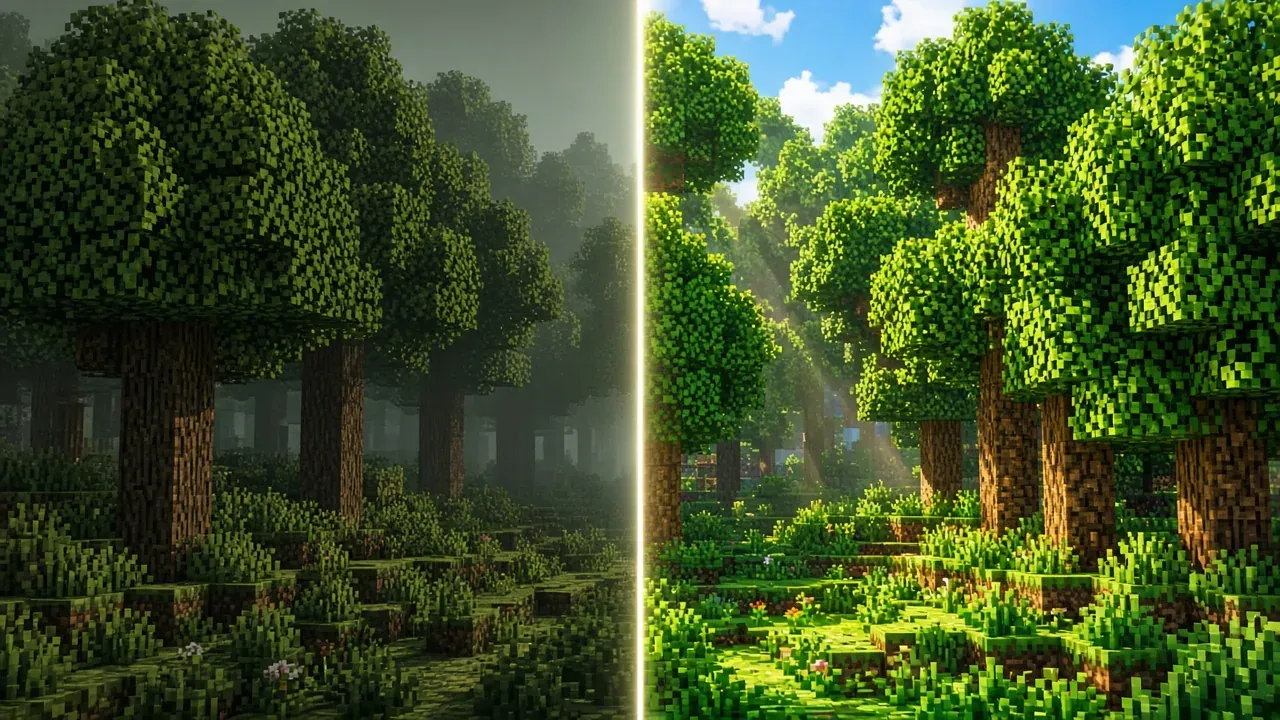
OptiFine and Sodium both get installed when the frame rate is low. They are different files, and the profile gets one of them. OptiFine’s own site calls it a Minecraft optimization mod that lets the game run faster and look better, with HD textures, shaders, dynamic lights, connected textures, and a long list of video options in that single download. Sodium’s Modrinth page calls it a high-performance rendering-engine replacement for the client. It improves frame rates and reduces micro-stutter, and it says the mod only optimizes rendering. That’s the key difference.
I play Minecraft 1.21.1 on NeoForge. The renderer is Sodium. The shader loader is Iris. We play a Create pack together and share it through the Modrinth App. That write-up is Create Aeronautics. OptiFine in that folder is a crash path. Fabric versus Forge is the loader decision. The rest of the jar list is best Minecraft performance mods. More guides sit on the guides index.
A shader is still a separate zip. The order for a low frame rate, after the jar is chosen, is how to increase FPS. I play this on an RTX 5080 + AMD Ryzen 9 9950X3D2 into a 1080p 240 Hz and a 1440p 155 Hz monitor. I haven’t measured an FPS difference between Sodium and OptiFine on that setup.
What you are keeping
What are you keeping?
Sodium, on Fabric or NeoForge
- Install the loader that profile already uses.
- Put Sodium in that mods folder. Leave OptiFine out.
- Add Lithium when you also want the simulation work. Sodium only replaces rendering.
- Press F3 in the same spot before and after. , note your FPS, swap mods, compare.
A new profile on Fabric or NeoForge starts on the first row. Sodium’s installation wiki, from version 0.6.0 onward, supports those two loaders and recommends Fabric for a new player because it is the lighter one. I still run the NeoForge build, because Create 6.0.10 for 1.21.1 is a NeoForge file.
| OptiFine | Sodium | Sodium + Iris | |
|---|---|---|---|
| What the official page calls it | Optimization mod, one download | Rendering-engine replacement | Shader loader on Sodium |
| Official loaders | Its own installer; Forge listed on some version rows | Fabric since 1.15; NeoForge since 1.21; Quilt on Modrinth | Fabric 1.16.5+; NeoForge 1.21.1+; Forge not supported |
| Shaders | In the same jar | No | Iris loads the OptiFine-format zip |
| Zoom / CTM / dynamic lights | In the same jar | Separate mods | Same separate mods |
| With the other renderer | Crashes next to Iris / Sodium | Crashes next to OptiFine | Iris names OptiFine as a crash |
| On my 1.21.1 pack | No | Yes | Yes — shaders optional |
One renderer in the folder
OptiFine, Canvas, and Vulkan mods are incompatible with Iris and crash the game. Sodium and OptiFine both take over rendering, so leaving both jars in the folder is the broken case. Taking one jar out is the fix. Renaming a jar does not make the second renderer safe. The shader page already walks through that crash, and through where the zip goes.
This choice is Java Edition. Iris says Bedrock cannot be modded this way, and that a download labeled as a Bedrock shader on a phone is often a scam. A Windows Bedrock path is a different product. Don’t mix it into a NeoForge instance.
Nvidium, on that same Iris FAQ, disables itself when shaders are on. Distant Horizons and Voxy are compatible with some shader packs, and the pack has to say so. I do not run Distant Horizons on the Aeronautics server. One renderer is the rule.
The loader on the jar
Sodium’s wiki lists Fabric since Minecraft 1.15 and NeoForge since 1.21. Modrinth also lists Quilt. Forge is absent from that list. Fabric versus Forge is the loader decision, and the file still has to match the profile, which is how to install a Minecraft mod. A Fabric jar placed in a Forge or NeoForge profile stays unloaded. Quilt is a Fabric fork. Some Fabric mods run on it, and Sodium publishes a Quilt build, so a Quilt profile uses that build.
Since 0.6.0, Sodium supports both Fabric and NeoForge and recommends Fabric for new players because it is lighter. That recommendation is for a new player. It is not a reason to move my Create pack. Create 6.0.10 for 1.21.1 is a NeoForge release. Do not drop a Fabric Sodium into that instance.
The official launcher keeps one mods folder for every profile if you are not careful. CurseForge, the Modrinth App, and Prism each keep a separate folder inside the instance. Edit the instance you launch. A change on the vanilla row leaves a NeoForge row on the old folder. We share the pack through a Modrinth invite. The app creates the instance with the right loader.
On Forge, official Sodium is not the file. A pack that names OptiFine was built for that jar. Follow the pack. On Forge, use Embeddium (Sodium port) and Oculus (Iris port). Iris’s NeoForge line wants Sodium.
Sodium’s support policy lists 1.21.1 as a branched 0.8.x line on Fabric and NeoForge. Current development sits on newer Minecraft versions. Branched means it still gets fixes.
Shaders
The Fabric wiki describes Iris as an open-source shader mod compatible with OptiFine shader packs, and it requires Sodium. Iris’s own site says the same, and the download ships with Sodium. Fabric is supported from 1.16.5. NeoForge is supported from 1.21.1. Forge is not supported. The installer can place both jars. If you download them yourself, both files still have to name the same Minecraft version.
The shader pack stays a zip in the shaderpacks folder. OptiFine’s docs treat a file that is not a zip as not a shader pack. Shaders spend frames, Iris included. Take the pack off while you are raising the counter, and put it back when the number is one you can keep. A resource pack that brings its own core shaders will not work while a shader pack is enabled. Ordinary textures still sit beside it.
Create Aeronautics lists visual issues with Iris. I treat shaders as optional in that world. On a weak PC, shaders off is the first win.
The features Sodium left out
OptiFine’s home page bundles dynamic lights, connected textures, zoom, HD textures, a long list of video options, better grass, random mobs, and chunk-loading controls. Sodium’s page claims a faster renderer and less micro-stutter, and it says the game should still look like Minecraft.
The Fabric wiki OptiFine alternatives page gives the reason the extras moved. OptiFine tends to cause incompatibilities with other mods, it may be less effective than the alternatives on that page, and it has no official Fabric support. Each extra became its own mod, so you can delete one without deleting the renderer.
The replacements that page and the Sodium wiki name, for the features people notice first:
- Zoom is Zoomify or Logical Zoom, a separate key.
- Connected textures, and OptiFine-format emissive textures on blocks and items, are Continuity. Its description says it provides OptiFine parity for the connected-texture format.
- Dynamic lights are LambDynamicLights. Sodium’s wiki describes that as a richer version of OptiFine’s handheld and dropped-item lighting.
- Custom entity models are Entity Model Features. Entity Texture Features covers OptiFine’s ETF format. CIT Resewn covers custom item textures.
- The extra video toggles are Sodium Extra, which aims to bring most of OptiFine’s eye-candy options to Sodium.
Install the row your pack uses. Leave the others out. Each file still has to match the loader and the Minecraft version. A new Minecraft release can update Sodium while Continuity is a version behind, or the other way around. That wait is the cost of the split. OptiFine’s cost is the opposite. One developer ships the whole catalog, so the renderer waits on the same update as the zoom key.
Sodium 0.5.x on 1.20 and older needed Indium for other Fabric mods that use the Fabric Rendering API, including Continuity. Iris says Indium should not be used on 1.21.1 and higher. My pack is 1.21.1. Don’t add Indium to a 1.21.1 Sodium 0.6 / 0.8 folder just because an old tutorial named it.
A pack that only replaces art works on either profile. A pack built for OptiFine connected textures needs OptiFine or Continuity. Load the pack before you delete the jar. If the glass stays as separate squares and the pack’s page says it needs OptiFine, stay on OptiFine. How to install a resource pack is the folder.
Test your own frame rate
OptiFine’s home page says an FPS boost is common, and it gives doubling as the example. That line is OptiFine describing the game without OptiFine. It is not a result against Sodium. Sodium’s page says it greatly improves frame rates and reduces micro-stutter, and it does not print a multiplier either.
Articles that do print one are one computer, one world, and one render distance. The gap moves when the processor, the graphics card, the distance, or the shader pack changes. Press F3. Stand in one spot. Note the number. Swap the jar, load the same world, and stand in that spot again at the same render distance. The pair of numbers is the comparison. Average frames are not the whole of it. Sodium’s page talks about micro-stutter, the hitch when new chunks build. Standing still for two seconds can hide the thing the renderer was written to change. Walk the same short path both times.
Sodium also says you can leave its defaults alone. It enables the optimizations your system supports. The Video Settings screen changes when the mod is loaded, which is the check that the jar is the one the profile launched. A settings tour is optional. The F3 pair is the test.
Lithium is separate. Sodium only optimizes rendering, and its install note points at Lithium for the rest of the game. The Fabric wiki describes that work as game physics, mob AI, and block ticking, without changing behavior. I do not list Lithium in the Create Aeronautics instance. I run ServerCore and spark on the server instead. A frozen world is the tick, not the renderer. Guessing “install Sodium on the dedicated server” is how you change nothing. The FPS page already puts Lithium on simulation. Best Minecraft performance mods is the jar order I actually use: Sodium, Iris, ModernFix, FerriteCore, ImmediatelyFast, Entity Culling, ServerCore, spark.
Cards Sodium will not support
Sodium officially supports desktop graphics cards with up-to-date drivers for OpenGL 4.5 or newer. It names three families. AMD Radeon HD 7000 series (GCN 1) or newer. NVIDIA GeForce 400 series (Fermi) or newer. Intel HD Graphics 500 series (Skylake) or newer. It says most cards from the past 12 years meet that. Minecraft itself asks for OpenGL 3.3, so an older card can run the game and still sit outside Sodium’s support. The project says it cannot promise those older cards will work, and that they may fail on a future Sodium version. Out-of-date drivers are the first thing the wiki tells you to fix.
Devices that reach OpenGL through a translation layer are a harder stop. Sodium names GL4ES, ANGLE, and GLonD3D12, says they are not supported, and says they will have severe performance issues or very likely not work. Android and some Windows-on-ARM devices sit in that bucket. That profile stays on OptiFine, or on the game with no renderer mod.
An RTX 5080 is not the limit. The pack is. Huge Aeronautics contraptions and new-chunk flight are the usual villains when the tick dies. /spark profiler points at a mod or a moving factory. Sodium will not fix that.
The server does not choose
Both mods are client-side. Sodium’s Modrinth page lists the supported environment as client. The server does not run them for you. A joining player keeps the renderer on their own profile. If the server’s resource pack uses OptiFine connected textures, a Sodium client sees those joins when Continuity is installed. Test that pack before you delete the jar the server’s page named.
A crash that says OutOfMemoryError: Java heap space is the memory limit on the profile. That setting is how to allocate RAM to Minecraft. A larger heap does not pick the renderer, and it does not raise the frame rate. Too much allocation can make garbage collection hitch. If the counter is still low, the next change is render distance, then simulation distance, on the FPS page.
How to choose, and the usual mistakes
Choose the loader first. My world is NeoForge 1.21.1. Sodium plus Iris is the pair that official pages support on that loader. A new Fabric player can follow Sodium’s Fabric recommendation and add Iris when they want a zip. Stay on OptiFine when the pack, the server page, or the resource pack names that one jar and you will not put Sodium next to it.
Mistakes that crash or waste a night:
- Sodium and OptiFine in the same folder. Iris already said crash.
- A Fabric Sodium jar in a NeoForge Create instance. The file has to name the loader.
- Iris plus Embeddium on NeoForge when Iris wants Sodium 0.6.
- Two Sodium jars because a kitchen-sink pack already shipped one.
- Sodium on the dedicated server to fix TPS.
- Every performance mod on a listicle in one night. Add Sodium. Play. Then add the next.
- Leaving shaders on while you try to raise F3. Iris spends frames. Aeronautics already warned about visual issues.
Decision rule: one renderer. On my NeoForge 1.21.1 pack that renderer is Sodium, with Iris only if I want the zip. OptiFine stays out. Back to the guides index.
Common questions
Can I use OptiFine and Sodium together?
No. Both replace Minecraft's renderer, so running them together crashes the game. Pick one per profile. My NeoForge 1.21.1 pack uses Sodium with Iris.
Does Sodium support shaders?
Not by itself. Install Iris alongside Sodium to load shader packs. Iris works on Fabric and on NeoForge from 1.21.1, but not on Forge.
Does Sodium work on Forge?
No. Sodium runs on Fabric, Quilt and NeoForge (NeoForge from 1.21), not on Forge. If you're on an older Forge modpack, stick with OptiFine or the performance mods that pack recommends.
Do OptiFine resource packs work with Sodium?
Most do. Simple texture packs work fine, but packs that use OptiFine's connected textures need the Continuity mod with Sodium. These are all client-side, so the server doesn't care.
Is Sodium faster than OptiFine?
Usually, yes. Most players see higher FPS with Sodium on modern versions. To check on your own PC, press F3, note your FPS in one spot, swap mods, and compare at the same render distance.
Should I use OptiFine or Sodium in 2026?
Sodium, if you're on Fabric or NeoForge. Add Iris for shaders. Only stick with OptiFine if your modpack or resource pack specifically requires it.
Does OptiFine work with Fabric or NeoForge?
No, there's no official OptiFine support for Fabric or NeoForge. Use Sodium and Iris on those loaders instead.
What mods replace OptiFine features like zoom and dynamic lights?
Zoomify or Logical Zoom for zoom, Continuity for connected textures, and LambDynamicLights for dynamic lights. Sodium Extra adds most of OptiFine's extra video settings. Make sure each mod matches your loader and Minecraft version.
Can I use OptiFine shader packs with Sodium?
Yes, through Iris. Iris supports most OptiFine shader packs, so just drop the zip into your shaderpacks folder.
Keep reading
Guides
Best Minecraft modpacks (2026): Best Minecraft modpacks (2026)
How to choose a 1.21.1 NeoForge pack in 2026 — ATM10, FTB StoneBlock 4, Vault Hunters, or a custom Create Aeronautics survival pack.
October 20, 2026 · 5 min read
Guides
Best Minecraft performance mods (2026): Sodium + Iris on NeoForge, then tick and RAM
A 2026 performance-mod guide that names Sodium, Iris, Lithium, and the jars in my NeoForge 1.21.1 Create Aeronautics pack.
October 20, 2026 · 5 min read
Guides
Minecraft Launcher
How the Minecraft Launcher works: pick a version, set up installations for mods, and fix the launcher when it won't start.
October 20, 2026 · 4 min read
Guides
Fabric vs Forge
Fabric, Forge, and NeoForge are different Minecraft loaders. The mod file names the one that has to be installed. My Create pack is NeoForge 1.21.1.
October 19, 2026 · 5 min read