
Hardware
Based on the makers’ specs and my own testing where I say so.
What a Mini-LED gaming monitor is doing
A Mini-LED gaming monitor is still an LCD. The backlight is split into zones that are larger than a pixel, so a small bright mark on black can wear a halo.
Updated 10 min readYuval Eizik
- pc
- monitor
This article has affiliate links. If you buy through them, I may earn a small commission at no cost to you. Prices move fast, so check the store for today's price before you buy.
Read the disclosure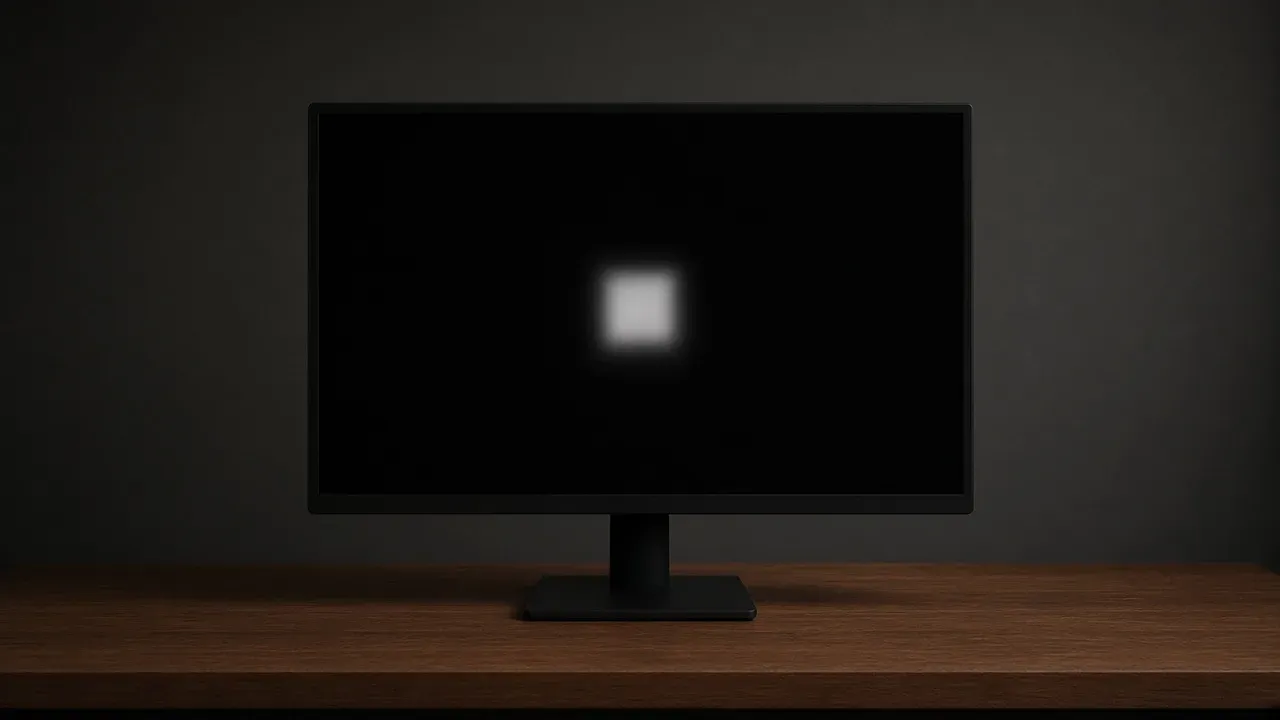
On this page
As an Amazon Associate I earn from qualifying purchases. I earn a small commission from Amazon links, at no cost to you. See disclosure.
A Mini-LED gaming monitor is an LCD with a backlight split into zones. The liquid crystals still block that light. They do not make it. A dark part of the picture can dim the zone behind it, and a small bright mark on black can light every pixel that shares the zone. OLED is the panel that turns each pixel’s own light off. For full picks, see the best gaming monitors. The zone count is the picture after those three numbers match.
I play Overwatch on a 1080p 240 Hz monitor and use a 1440p 155 Hz for everything else, driven by an RTX 5080. More monitor guides.
The cursor lights the zone behind it, and that zone is many pixels wide. Local dimming can be turned off for the desktop. The zone count on the listing is the size of that halo.
Mini-LED monitors worth a look
- MSI MPG 274URDFW E16M. Official page: 27” Rapid IPS Mini-LED, 1,152 full-array local dimming zones, Dual Mode UHD 160 Hz / FHD 320 Hz, VESA DisplayHDR 1000, 0.5 ms (GtG, min.), Quantum Dot, DCI-P3 98%, NVIDIA G-SYNC Compatible, AMD FreeSync Premium, USB-C with 98 W. MSI writes that full-array Mini-LED is deeper blacks and reduced halo next to conventional LED. MSI page. MSI spec. Amazon search for MPG 274URDFW E16M
- ASUS ROG Swift PG32UQX. Official US page: 32” 4K (3840 × 2160) IPS mini LED, 144 Hz, NVIDIA G-SYNC Ultimate, 1,152 independent LED zones, full-array local dimming, peak 1,400 nits, DisplayHDR 1400, Quantum Dot, DCI-P3 98%. ASUS says portions of that backlight can turn off as needed, and that the FALD array is for contrast with minimal halo effects. ROG US page. ROG spec. Amazon search for PG32UQX
- Samsung Odyssey Neo G7 (US SKU LS32BG752NNXGO, G75NB family). Official US page: 32” 4K, 165 Hz, 1 ms (GtG), 1000R curve, Quantum HDR 2000, Quantum Mini LED, AMD FreeSync Premium Pro. Samsung’s US news note on that G75NB line prints Quantum Mini LED, a 2,000 nit peak, and a 1,000,000:1 static contrast. Samsung’s UK spec for the G75NB prints Mini LED local dimming, 1,196 zones. Samsung US page. Samsung UK spec. Amazon search for Odyssey Neo G7 32
The short version: Mini-LED dims a zone. Buy the resolution and Hertz the PC already holds. Divide pixels by the printed zone count before you trust the badge.
| MSI 274URDFW E16M | ASUS PG32UQX | Samsung Neo G7 32" | |
|---|---|---|---|
| What the maker names | Rapid IPS Mini-LED, 1,152 FALD zones | IPS mini LED, 1,152 FALD zones | Quantum Mini LED, 1,196 zones (UK spec) |
| Pixels / size | 3840 × 2160, 27" | 3840 × 2160, 32" | 3840 × 2160, 32" 1000R |
| Refresh on the box | 160 Hz UHD / 320 Hz FHD Dual Mode | 144 Hz | 165 Hz |
| HDR / peak the maker prints | DisplayHDR 1000 | DisplayHDR 1400, 1,400 nits peak | Quantum HDR 2000, 2,000 nits (news note) |
| VRR the listing names | G-SYNC Compatible / FreeSync Premium | G-SYNC Ultimate | FreeSync Premium Pro |
| I own it? | No | No | No |
The backlight is still on
On an ordinary LCD the backlight is one light for the whole panel. Turn it up for a highlight and the darks come up with it. Local dimming cuts that light into regions, so a bright corner can stay high while another region drops. Mini-LED is that idea with smaller lamps, which is how a listing gets hundreds or thousands of regions instead of a handful. The crystals in front of those lamps still leak a little. How little they leak, with the backlight full on, is the native contrast. Dimming a zone gives the leak less light to work with. It does not close the pixel.
IPS versus VA is still the crystal page. MSI’s 274URDFW E16M is Rapid IPS. Samsung’s Neo G7 family is a curved VA on the UK spec. A VA panel often starts with a higher native contrast before any zone drops. An IPS panel often keeps the viewing angle. Mini-LED does not replace that choice. It sits behind it.
Two layouts still hide under the same badge. Full-array local dimming puts zones across the back of the screen. Edge lighting puts them in strips along a side, and a strip covers a band of the picture rather than a patch. MSI and ASUS both print full-array on the three named pages above. A badge that only says Mini-LED has not said which of those two you are buying. Full-array is the layout that can put a small zone behind a small highlight. A strip cannot.
How big one zone is
The count that matters is the one printed on the listing in front of you. MSI and ASUS both print 1,152. Samsung’s UK G75NB spec prints 1,196. Those are not a required minimum for the word Mini-LED. They are the share on those three boxes.
You can do the division without a ruler. A 1440p panel is 2560 × 1440, which is 3,686,400 pixels. A 4K panel is 3840 × 2160, which is 8,294,400 pixels. Divide that total by the zone count. At 1,152 zones, 4K is 7,200 pixels sharing one light. At 1,196 zones, 4K is about 6,935. If that same 1,152-zone backlight sat behind 1440p, the share would be 3,200. Those are the pixels that rise together when any one of them needs to be bright and the rest of the zone wanted to stay black. A higher zone count on the same resolution makes each share smaller. It never makes the share one pixel.
MSI’s Dual Mode is the other half of that arithmetic. The 274URDFW E16M can run 1080p at 320 Hz. The zone count does not change when the pixel count drops. The share gets smaller because there are fewer pixels, not because the lamps moved. Do the division for the resolution you will actually use. An asterisk in Windows that drops the resolution means you are not looking at the pixel count you divided into the zones.
A 27-inch 4K pixel is a fraction of a millimeter. A 1,152-zone grid on that panel is a block you can see if the scene is simple enough. Treat the count as a share, not as a photograph of the backlight.
What the halo is
Blooming, or the halo, is the light from a bright object spilling into the dimmed zones around it. MSI’s own Mini-LED explainer on the 274URDFW E16M page puts “strong halo and light bleeding” on conventional LED and “reduced halo, controlled blooming” on full-array Mini-LED. Reduced is not gone. ASUS’s PG32UQX page uses the same honesty in different words: minimal halo effects, not none.
A cursor on a plain dark desktop is the scene that shows it, because almost every zone can stay down except the one under the pointer, and that one zone is still thousands of pixels. Move the pointer and the lit block moves with it. Local dimming was not built for that desktop. If the monitor menu has a local dimming or variable-backlight control, it can be turned off when you are not in a game or a film. Off, the backlight is one light again. The darks rise with the highlights. That is the ordinary LCD you already know.
In a game the same spill is easier to miss, because the picture is already full of edges. It shows up where the scene is simple and harsh: stars on a night sky, fireworks, white subtitles on black, a loading screen with a mark in the middle. The program that drives the zones is part of the difference. One maker will hold the peak and allow more spill. Another will crush the spill and give up some of the peak. A few listings offer presets for that balance. The preset is a preference. It does not change how many pixels sit in the zone.
Brightness, and the pixel that turns off
The other number people buy Mini-LED for is a bright window that stays bright. OLED limits full-screen white. The behavior is called automatic brightness limiting, and the OLED page already treats a typical-nit row and a True Black badge as two different lines. A Mini-LED backlight can stay up across that same white window, because the lamps are still there. The listing has to print two brightness lines for that claim to mean anything: the peak of a small patch, and the level when most of the screen is white.
ASUS prints 1,400 nits peak and DisplayHDR 1400 on the PG32UQX. MSI prints DisplayHDR 1000 on the 274URDFW E16M, and the spec sheet next to it prints 400 nits SDR and 1,000 nits HDR peak. Samsung’s G75NB news note prints Quantum HDR 2000 and a 2,000 nit peak. Those are maker lines, not measurements I took. A single nit number, or the letters HDR, does not say which of those two windows you will get. Monitor HDR is that brightness page. DisplayHDR on a badge is a lab pass for a signal. It is not the zone count, and it is not the full-screen line.
OLED still does the thing a zone cannot. A black pixel is off. There is no lamp behind it to leak, and no neighbor inside the same zone that has to come along for the ride. In a dark room, that is the difference you can see. Mini-LED can look very dark when the zone is dimmed and the scene cooperates. A black pixel inside a lit zone is only as dark as the crystals can block. The two pictures meet in a mixed scene and separate on a small white mark against black, and again on a window that is almost entirely white.
Unlike OLED, Mini-LED doesn’t burn in. A Mini-LED monitor does not have an emitter in each pixel, so it does not come with that warranty question. A static taskbar is also the scene that shows a halo if local dimming stays on. Turn the dimming off for the desktop, and you have given up the contrast you bought the zones for, during the hours you are not in a game. That trade is the decision. Neither picture is the best one for every desk.
What the listing has to name
Read four lines before the badge. The lights are full-array or they are edge-lit. The zone count is a number, not the word Mini-LED. The full-screen brightness sits next to the small-window peak. Local dimming can be switched, and the switch may have more than one strength.
A quantum-dot line on the same box is a claim about color, not about the lamps. MSI and ASUS both print Quantum Dot next to the zone count. Samsung prints Quantum Mini LED as the backlight name. Quantum-dot film does not change how many pixels share a zone, and it does not turn the backlight off. Read it beside the printed zone count.
The refresh you will see is still the counter in the game, counted at that same resolution. MSI’s Dual Mode is a second Hertz at a second pixel count, not a free 320 Hz at 4K. ASUS’s 144 Hz and Samsung’s 165 Hz are the 4K rates on those boxes. Variable refresh decides when the next picture starts. It does not shrink a zone.
Resolution, size, and refresh still come first. A Mini-LED panel at a rate the PC cannot hold still shows the frames the PC finishes. I would not buy 4K Mini-LED for a competitive Zarya screen. I would only look at it for the desk that already holds 4K. 4K is that pixel-count page. A 1 millisecond badge, or a 0.03 millisecond badge on a different technology, is one lab transition. It is not the refresh, and it is not the time from a click to the picture. Response time is that millisecond. The port still has to carry the resolution and the rate together.
How to choose, and what people mix up with it
Choose Mini-LED when you want a bright window that stays up, and you will accept a zone instead of a pixel that turns off. Choose OLED when the dark room and the off pixel matter more than a full white window, and you will read the burn-in sentence on that SKU.
Do not buy the badge because it sounds like more frames. Local dimming does not raise FPS. An FPS monitor still has to match the resolution and Hertz the PC already finishes. Do not buy a higher zone count on a higher resolution and call that a smaller halo without doing the division. 1,152 zones at 4K is a larger share than 1,152 zones at 1440p.
Do not treat Quantum HDR, DisplayHDR, or a nit peak as the zone count. Those are brightness and signal lines. Do not treat a curve as Mini-LED. Samsung’s 1000R Neo G7 is curved and Mini-LED. MSI’s 27-inch is flat and Mini-LED. The lamps and the bend are different rows.
The test that stays is a cursor on a black desktop, a subtitle on a dark scene, and a window of white. If the halo is the thing you cannot stop seeing, more zones shrink it and a pixel that turns off removes it. If the bright window is the thing you cannot get, read the full-screen line. The badge does not settle either one.
Mini-LED dims a zone. Buy the resolution and Hertz first. Divide pixels by the printed count, then look at a cursor on black. More monitor guides.
Common questions
What is a Mini-LED gaming monitor?
It's an LCD monitor with a backlight made of thousands of tiny LEDs grouped into dimming zones. Dark parts of the picture can dim their zones for much better contrast. The MSI MPG 274URDFW E16M, for example, has 1,152 zones.
Do more dimming zones get rid of halos?
They reduce halos but never fully remove them. Each zone still covers many pixels, so bright objects on black backgrounds can glow slightly. More zones means smaller, less noticeable halos.
Is Mini-LED the same as OLED?
No. Mini-LED dims zones of a backlight, while OLED pixels make their own light and can switch off completely. That gives OLED perfect blacks with no halo, while Mini-LED is usually brighter.
Should I turn local dimming on or off?
Keep it on for games and movies, where it greatly improves contrast. On a dark desktop, you might turn it off if the glow around your cursor bothers you. Check your monitor's menu for the setting.
What should I look for when buying a Mini-LED monitor?
Look for full-array local dimming, the number of zones, full-screen brightness and peak brightness. Resolution, size and refresh rate still matter most for gaming.
What is blooming on a Mini-LED monitor?
It's the halo of light that spills around bright objects on a dark background. It happens because each dimming zone covers many pixels. A white cursor on a black screen is where you'll notice it most.
Do Mini-LED monitors get burn-in?
No. Mini-LED is an LCD with a backlight, so it doesn't have OLED's burn-in risk. That makes it a good choice if you leave static taskbars or HUDs on screen for hours.
Is Mini-LED brighter than OLED?
Usually, yes, especially for full-screen brightness. Mini-LED monitors like the ASUS PG32UQX reach 1,400 nits peak, while OLEDs often dim large bright areas to protect the panel.
Does a Mini-LED monitor increase FPS?
No. The backlight has nothing to do with frame rate. Your GPU, resolution and settings still decide your FPS.
Keep reading
Hardware
What a 1440p 240 Hz monitor is for
A 1440p 240 Hz monitor is 2560 by 1440 and can start up to 240 pictures a second, usually at 27 inches.
October 20, 2026 · 9 min read
Hardware
What a 360 Hz gaming monitor shows
A 360 Hz monitor can start a picture about every 2.8 milliseconds. That is about 1.4 milliseconds after 240. You see it only while the counter sits near 360.
October 20, 2026 · 10 min read
Hardware
What an FPS monitor has to match
An FPS monitor is the Hertz the PC can fill, at a size that fits your desk, with a pixel that can finish and VRR that can follow.
October 20, 2026 · 10 min read
Hardware
What monitor input lag is
Monitor input lag is the wait after the PC has sent a frame, before the panel begins the picture. The 1 ms on the box is a pixel change.
October 20, 2026 · 10 min read